aaP_ebe4952 since this afternoon (time of Indonesia), I can't open the dasboard of aapanel on my vps. what's the problem? last I accsessed today on 11.00 am was still working.
aaP_hareeshnarayan1982 Did you checked ssl? if you force ssl and if it didn't renewed this may happen.
MoAdel The same thing happened to me after installing aapanel When I go to the link, the same thing appears
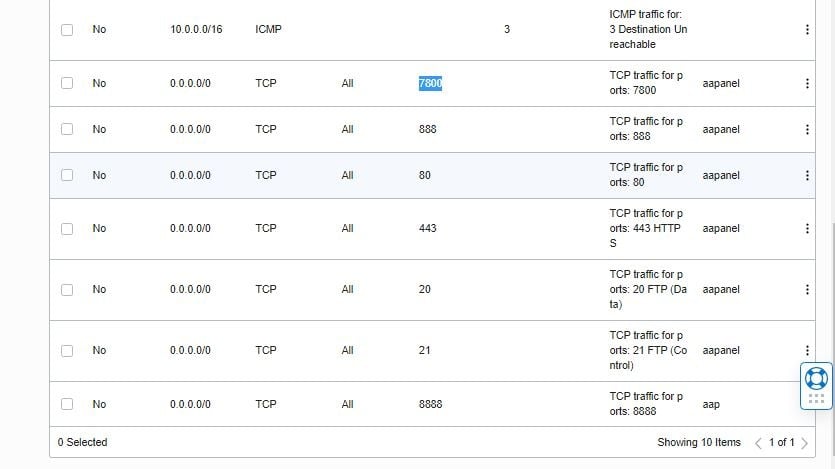
aaPanel_Jose MoAdel Please see if your server firewall rules allow the panel port? Centos: firewall-cmd --list-all ubuntu: ufw status
aaP_Rajib MoAdel try to open all the port in your iptables. iptables -I INPUT -p tcp --dport 7800 -j ACCEPT Just change the port number. Then save the rules. sudo /sbin/iptables-save > /etc/iptables/rules.v4
MoAdel aaP_Rajib aaPanel_Jose This problem happened to me. Not installing the email server https://kapwi.ng/c/CKSNRovVNl
aaP_Rajib MoAdel did you open the port in putty using the command below? iptables -I INPUT -p tcp --dport 7800 -j ACCEPT And all other ports need for aaPanel After that only save the iptables rules.
aaP_Rajib MoAdel is this working? Please let us know so others can get the solution from here with same issue.
MoAdel aaP_Rajib Yes it works Another question, does Nginx work well on ARM processor This command "iptables -I INPUT -p tcp --dport 7800 -j ACCEPT" must be applied to all ports.
aaP_Rajib MoAdel yes nginx works great but don't install nginx free firewall. This both doesn't work together in arm instance till now. Hopefully admin can fix that issue. And yes you need to open all the port in iptables using that command. Just change the port number instead of 7800 to 80,443 and other ports need for aapanel