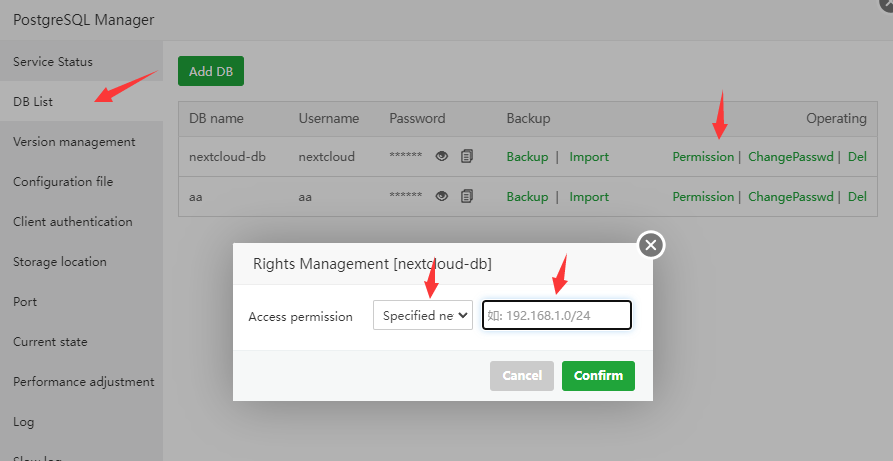
aaP_symentix_rahul I want to try to connect Postgres DB DB from aaPanel to my system could anyone please tell me how to connect it and what should i do for connectivity.
aaPanel_Kern aaP_symentix_rahul Hello, you can set the accessible ip in "Permission" in "DB List" of "PostgreSQL Manager" interface. Then open port 5432 in the "Security" interface and the server provider's firewall (security group), so that you can connect to PostgreSQL remotely
kloudboy aaPanel_Kern what about this in latest panel? This interface will be abandoned, Please go to "Databases - PgSQL" management there is no Rights Management settings
aaPanel_Kern Hello Thanks for your feedback, we will add it in the future. You can try installing an older version of PostgreSQL manager first kloudboy
aaPanel_Kern kloudboy Hello, Any information? What version of PostgreSQL Manager is used? It is recommended that you install 2.5 first
edward_nguyen aaPanel_Kern Hi, I hope PostgREST will be integrated into aaPanel. It would be a game changer. This is an essential feature for modern tech stacks. It allows PostgreSQL to be accessed securely over HTTP by clients or across cloud clusters.