adzcode
Hi. Try to restart the mysql server from the panel . The new port to take effect needs a restart of the service mysqld .
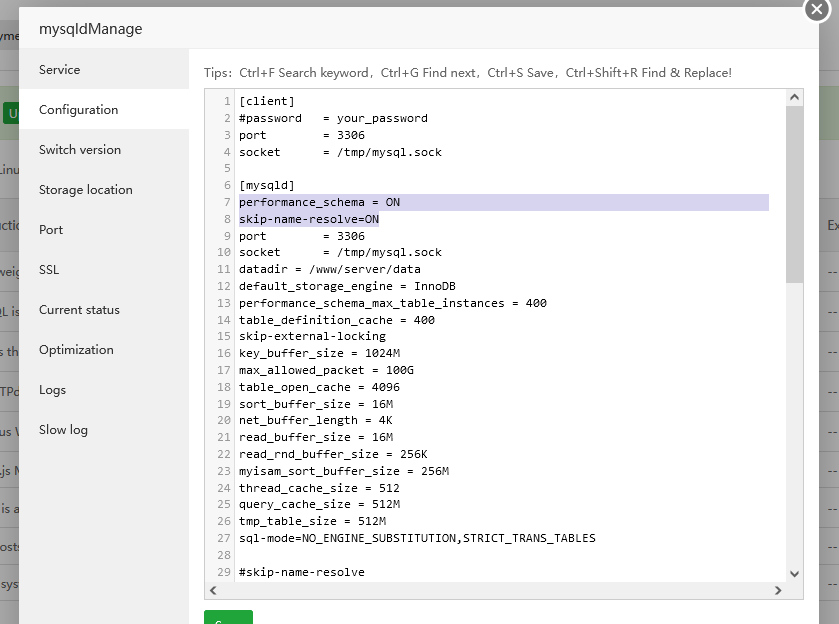
If doesn't help try editting the config file . In CentOS is the my.cnf file
`$ cat /etc/my.cnf | grep port
port = 3306
port = 3306
$ cat /etc/my.cnf
[client]
#password = your_password
port = 3306
socket = /tmp/mysql.sock
[mysqld]
slow_query_log = 1
slow-query_log_file = /var/log/mysql-slow.log
long_query_time = 2
binlog_cache_size = 192K
thread_stack = 384K
join_buffer_size = 4096K
query_cache_type = 1
max_heap_table_size = 1024M
port = 3306`
At debian and maybe other systems is called mariadb.cnf
/etc/mysql/mariadb.cnf
If you change it on a server level restart mysql again from the panel and if needed on the server with
systemctl restart mysqld or systemctl restart mariadb
Good luck
P.S Do not forget to add the new port to the firewall if you are using one like firewall-cmd --add-port=3308/tcp --permament
firewall-cmd --reloadCheers