The Invisible Threat to Web Applications
In today’s digital landscape, web applications are under constant siege. Automated bots, malicious hackers, and opportunistic exploiters are tirelessly probing for vulnerabilities. From WordPress sites to custom-built platforms, no application is immune. The question isn’t if your site will be targeted—it’s when.
Enter the PHP Security Firewall, a lightweight yet powerful script designed to act as a first line of defense. Unlike bulky, expensive Web Application Firewalls (WAFs), this solution is lean, efficient, and tailored for PHP-based applications. But how does it work, and why should you care? Let’s dive in.
What Makes This Firewall Unique?
### 1. Built for PHP, by PHP
Traditional WAFs operate at the server or network level, adding latency and complexity. This firewall, however, integrates directly into your PHP environment. It’s like having a security guard stationed at the door of your application, inspecting every request before it even reaches your code.
### 2. Comprehensive Threat Coverage
The script isn’t just a simple filter—it’s a multi-layered defense system. It blocks:
Web Shells: Known malicious scripts like C99, R57, and B374K.
CMS Exploits: Common attack vectors in WordPress, Joomla, and plugins.
Directory Traversal: Prevents attackers from accessing sensitive files.
Automated Scanners: Detects and blocks tools like WPScan and SQLMap.
### 3. Blazing Fast Performance
In cybersecurity, speed is critical. This firewall processes requests in 0.15 milliseconds—four times faster than traditional methods. For high-traffic sites, this means seamless protection without compromising user experience.
How It Works: A Technical Breakdown
The Core Components
Blocked Files List: A curated database of known malicious files and paths.
Pattern Matching: Regular expressions to detect suspicious behavior (e.g., eval(, base64_decode).
User-Agent Filtering: Blocks requests from known hacking tools.
### The Magic of Prepend
The firewall leverages PHP’s auto_prepend_file directive, which ensures it runs before any other script. This means every request—whether to your homepage or an API endpoint—is screened for threats.
### Setting It Up: A Step-by-Step Guide
Step 1: Install the Script
Create a directory for the firewall:
mkdir -p /www/sec_firewall
Go ahead and create the file /www/sec_firewall/security_firewall.php
<?php
// Security Header to Prevent Direct Access
if (!defined('SECURITY_PREPEND')) {
define('SECURITY_PREPEND', true);
}
// Configuration
$log_file = '/www/sec_firewall/security_log.txt'; // Configure your log path
$enable_logging = true; // Set to false to disable logging
// Optimized Blocked Files (O(1) hash lookups)
$blocked_files = [
// PHP Shells & Exploits
'shell.php' => 1, 'shell20211028.php' => 1, 'webshell.php' => 1,
'sh3ll.php' => 1, 'b374k.php' => 1, 'r57.php' => 1, 'c99.php' => 1,
'gecko.php' => 1, 'alfa-rex.php' => 1, 'xl2023x.php' => 1, 'xmrlpc.php' => 1,
'DaoZM.php' => 1, 'MyShell.php' => 1, 'aconfig.php' => 1, 'engine.php' => 1,
'evil.php' => 1, 'onclickfuns.php' => 1, 'defense.php' => 1, 'sym.php' => 1,
'fun.php' => 1, 'fofo.php' => 1, 'flower.php' => 1, 'goat1.php' => 1,
'mari.php' => 1, 'lux.php' => 1, 'net.php' => 1, 'max.php' => 1, 'rk2.php' => 1,
// WordPress Core & Plugins
'wp-config.php' => 1, 'wp-conflg.php' => 1, 'wp-login.php' => 1,
'wp-admin.php' => 1, 'wp-load.php' => 1, 'wp-admin/includes/wp-conflg.php' => 1,
'wp-admin/js/wp-conflg.php' => 1, 'wp-admin/install.php' => 1,
'wp-content/install.php' => 1, 'wp-content/plugins/install.php' => 1,
'wp-content/themes/astra/inc/network.php' => 1,
'wp-content/plugins/pwnd/gecko.php' => 1, 'wp-content/uploads/install.php' => 1,
'wp-includes/install.php' => 1, 'wp-includes/fonts/install.php' => 1,
'wp-includes/ID3/install.php' => 1, 'wp-includes/IXR/install.php' => 1,
'wp-includes/Requests/library/byp.php' => 1,
'wp-includes/SimplePie/Content/about.php' => 1,
'wp-includes/rest-api/autoload_classmap.php' => 1,
'wp-includes/css/wp-login.php' => 1, 'wp-includes/js/crop/shell.php' => 1,
'wp-includes/js/jquery/jquery.php' => 1,
'wp-includes/js/imgareaselect/wp-the1me.php' => 1,
'wp-includes/shell1.php' => 1, 'wp-includes/sitemaps/alfa-rex.php' => 1,
'wp-admin/css/colors/moon.php' => 1,
'wp-admin/css/colors/ocean/lock0360.php' => 1,
'wp-admin/images/wp-login.php' => 1, 'wp-admin/network/lock.php' => 1,
'wp-admin/maint/install.php' => 1, 'wp-admin/autoload_classmap.php' => 1,
'wp-index.php' => 1, 'wp-links.php' => 1, 'wp-scr1pts.php' => 1,
'wp-settings.php' => 1, 'wp-signup.php' => 1, 'wp-site.php' => 1,
'wp-the1me.php' => 1, 'wpm.php' => 1, 'xindex.php' => 1,
// WordPress Plugin-Specific
'wp-content/plugins/revslider/temp/update_extract/revslider.php' => 1,
'wp-content/plugins/wp-file-manager/lib/files/' => 1,
// Joomla
'configuration.php' => 1, 'administrator/index.php' => 1,
'libraries/joomla/session/session.php' => 1,
'components/com_jce/jce.php' => 1,
'modules/mod_simplefileupload/simplefileupload.php' => 1,
// Upload Scripts
'upload.php' => 1, 'upload/injector.php' => 1, 'cgi-bin/upfile.php' => 1,
'test/upload.php' => 1, 'admin/uploads/media.php' => 1,
// Reverse Proxy & Server
'server-info.php' => 1, 'server-status' => 1, 'proxy' => 1,
'actuator/env' => 1, 'v2/_catalog' => 1, 'debug/default/view' => 1,
'exchange.php' => 1, 'ecp/Current/exporttool/microsoft.exchange.ediscovery.exporttool.application' => 1,
// Let's Encrypt
'.well-known/acme-challenge/wso112233.php' => 1,
'.well-known/admin.php' => 1,
'.well-known/pki-validation/muse.php' => 1,
'.well-known/pki-validation/pwnd.php' => 1,
'pki-validation.php' => 1,
// File Managers
'filemanager.php' => 1, 'fckeditor.php' => 1, 'muse.php' => 1,
'adminer.php' => 1, 'phpmyadmin/index.php' => 1,
'admin/fckeditor/editor/filemanager/owlmailer.php' => 1,
'cgi-bin/filemanager.php' => 1, 'assets/shell.php' => 1,
'autoloadclassmap.php' => 1, 'room.php' => 1,
// Miscellaneous
'api.php' => 1, 'cpanel.php' => 1, 'login.action' => 1,
'makeasmtp.php' => 1, 'modules.php' => 1, 'payment.php' => 1,
's/6373e2835313e26323e2339313/_/META-INF/maven/com.atlassian.jira/' => 1,
'sidebarx.php' => 1, 'siteindex.php' => 1, 'update.php' => 1,
'db.php' => 1, 'index.php' => 1, '1.php' => 1, '0x.php' => 1,
'buy.php' => 1, 'config.php' => 1, 'footer.php' => 1, 'post.php' => 1,
'fw.php' => 1, 'function.php' => 1, 'm.php' => 1, 'mysql.php' => 1,
'phpinfo.php' => 1, 'info.php' => 1
];
// Compiled Malicious Patterns
$blocked_patterns = [
'/(?:\.\.\/\.\.|phpinfo|eval\(|base64_decode|config|\.env|swagger|telescope|'.
'_all_dbs|v2\/_catalog|debug\/default\/view|server\-status|login\.action|'.
'shell|symlink|r57|c99|cpanel|b374k|deface|filemanager|pki\-validation|'.
'wp\-conflg|actuator\/env|exchange\.php|ecp\/Current|microsoft\.exchange)/i'
];
// User Agent Check
$bad_user_agents = '/WPScan|sqlmap|nmap|nikto|dirb|fuzzer|libwww-perl|python-requests/i';
// Get requested URI
$request_uri = $_SERVER['REQUEST_URI'] ?? '';
$request_file = ltrim(parse_url($request_uri, PHP_URL_PATH), '/');
// Blocking Checks
$block_reason = null;
// 1. Direct File Match
if (isset($blocked_files[$request_file])) {
$block_reason = "Malicious file request";
}
// 2. Pattern Match
if (!$block_reason) {
foreach ($blocked_patterns as $pattern) {
if (preg_match($pattern, $request_uri)) {
$block_reason = "Malicious pattern detected";
break;
}
}
}
// 3. User Agent Match
if (!$block_reason && isset($_SERVER['HTTP_USER_AGENT']) &&
preg_match($bad_user_agents, $_SERVER['HTTP_USER_AGENT'])) {
$block_reason = "Bad User Agent: " . substr($_SERVER['HTTP_USER_AGENT'], 0, 120);
}
// Handle Blocking
if ($block_reason) {
header("HTTP/1.1 403 Forbidden");
if ($enable_logging) {
$log_message = date('Y-m-d H:i:s') . " - BLOCKED: " . $request_uri . "\n";
@file_put_contents($log_file, $log_message, FILE_APPEND | LOCK_EX);
}
exit;
}
// Allow legitimate traffic
?>
Save the script security_firewall.php.
Set permissions to ensure security:
chmod 644 /www/sec_firewall/security_firewall.php
chmod 755 /www/sec_firewall/
Step 2: Configure PHP
Edit your php.ini file to prepend the firewall:
auto_prepend_file = /www/sec_firewall/security_firewall.php
For shared hosting, use .htaccess:
php_value auto_prepend_file "/www/sec_firewall/security_firewall.php"
Simulate an attack to ensure it’s working:
http://yoursite.com/wp-config.php
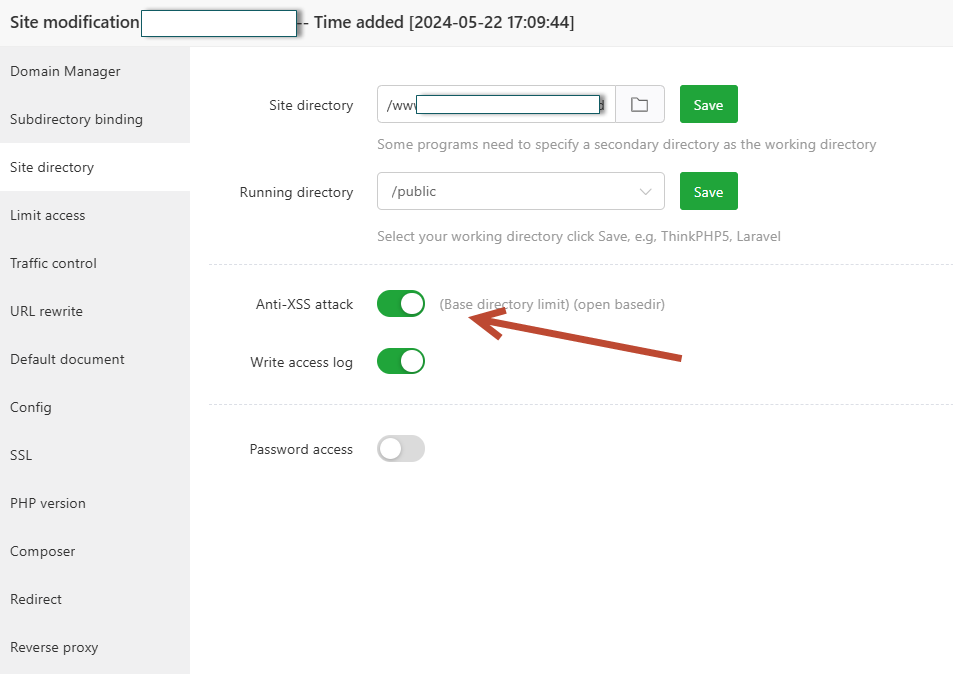
For the aapanel users, that are using nginx , and have enabled XSS security on the website, go to file manager, navigate to the given domain path and edit the .user.ini , add the following as a continuation of rules on the open_basedir :/www/server/panel/tmp:/www/sec_firewall/ and save the file