hola si alguien logro hacerlo agradecido - vsconfiguraciones@gmail.com :
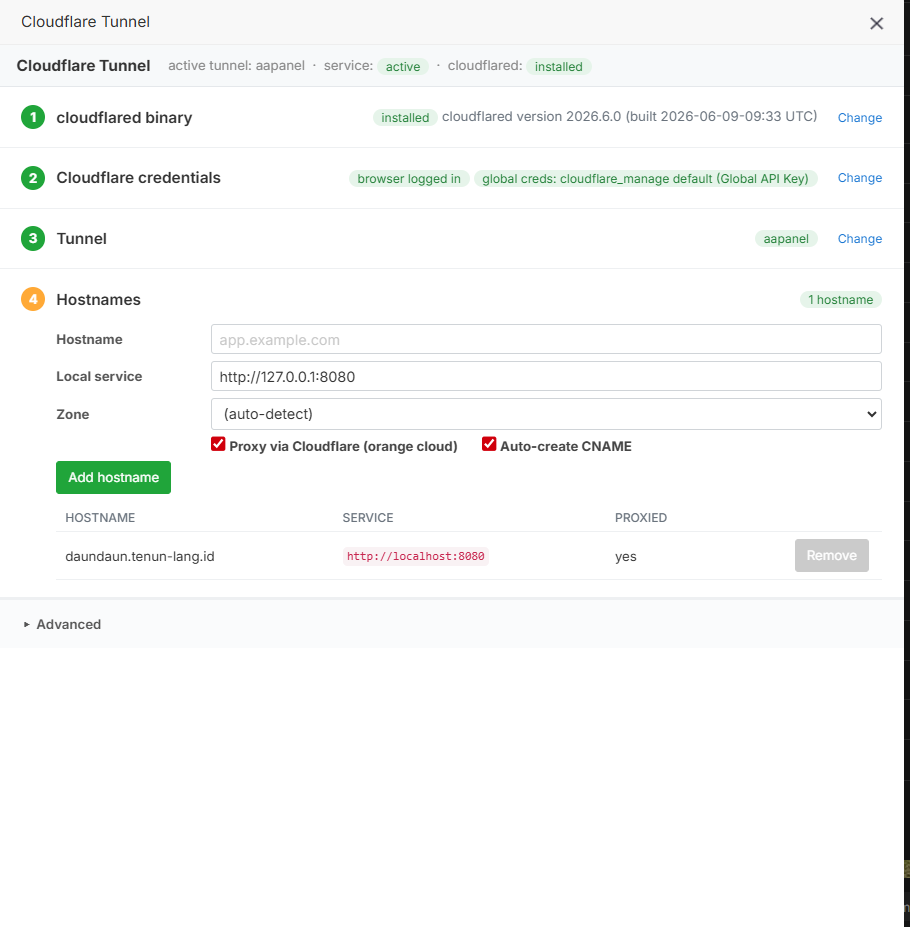
Es totalmente posible exponer tus sitios web de aaPanel a través de un Cloudflare Tunnel (Cloudflare Tunnel en la nube) administrando todo desde la interfaz de usuario, sin abrir puertos en tu router, sin IP pública y sin editar manualmente los archivos de configuración de Nginx.
Para lograr que toda la gestión (DNS, túneles, mapas de entrada y el servicio de systemd) se controle de forma visual, utilizaremos el plugin oficial de Cloudflare en aaPanel o, en su defecto, la propia interfaz web de Cloudflare Zero Trust.
A continuación, se detalla el proceso paso a paso:
⚙️ Requisitos Previos
- Una cuenta activa en Cloudflare.
- Un dominio agregado a tu cuenta de Cloudflare y apuntando a sus servidores DNS.
- El panel aaPanel instalado y funcionando en tu servidor local.
🛠️ Paso 1: Instalar el plugin de Cloudflare en aaPanel
aaPanel cuenta con herramientas en su tienda de aplicaciones que facilitan esta integración para no tocar la terminal.
- Inicia sesión en tu aaPanel.
- Ve a la sección App Store en el menú lateral izquierdo.
- En el buscador de la tienda, escribe Cloudflare.
- Busca el plugin llamado Cloudflare o Cloudflare Tunnel (según la versión actual de la tienda) e instálalo.
- Una vez instalado, abre la configuración del plugin desde la lista de aplicaciones de aaPanel.
🔑 Paso 2: Vincular con Cloudflare mediante Token / API
Para que aaPanel pueda gestionar tus DNS y túneles de forma automática:
- Ve a tu panel de control de Cloudflare y genera un API Token con permisos de edición de zonas DNS (Zone.DNS).
- Copia el token generado.
- Regresa a aaPanel, abre el plugin de Cloudflare y pega el token (o tu Email + Global API Key, según te lo solicite el plugin).
- Guarda los cambios. Ahora aaPanel tiene comunicación directa con tu cuenta de Cloudflare.
🗺️ Paso 3: Crear el Túnel y gestionar los mapas de entrada (Ingress)
Desde la misma interfaz del plugin en aaPanel, puedes desplegar el túnel que levantará el servicio systemd en segundo plano de forma automática:
- Dentro del plugin de Cloudflare, dirígete a la pestaña Tunnels (Túneles).
- Haz clic en Create Tunnel (Crear Túnel). Asignale un nombre (por ejemplo, servidor-local).
- El plugin instalará automáticamente el demonio cloudflared y creará el servicio de systemd en tu sistema sin que ejecutes comandos.
- Una vez activo, selecciona el túnel y ve a la sección de Mapping o Ingress Rules (Reglas de entrada):
• Domain / Subdomain: Escribe el dominio que quieres usar (ej. misitio.com o ://misitio.com).
• Service Type: Selecciona HTTP.
• URL / Local Port: Escribe 127.0.0.1 seguido del puerto local que usa tu sitio web en aaPanel (por defecto, el tráfico local suele ir al puerto 80).
- Guarda la regla.
Al hacer esto, el plugin automáticamente creará el registro DNS tipo CNAME apuntando a tu túnel en Cloudflare y configurará el mapeo interno.
🌐 Paso 4: Configurar el Sitio en aaPanel (Sin tocar Nginx)
Para que aaPanel reciba correctamente el tráfico que Cloudflare le envía localmente:
- Ve a la sección Website de aaPanel.
- Añade un nuevo sitio web haciendo clic en Add site.
- En el campo de dominio, escribe el mismo dominio o subdominio que configuraste en el túnel (ej. misitio.com).
- En la configuración avanzada, asegúrate de que el sitio escuche en el puerto local estándar (80).
- No necesitas tocar la pestaña de configuración de Nginx. Al haber mapeado el túnel hacia 127.0.0.1:80, Cloudflare interceptará el dominio externo y lo entregará de forma segura a la IP local de tu servidor.
🛡️ Método Alternativo: Gestión 100% en la nube vía Cloudflare Zero Trust
Si el plugin de tu versión de aaPanel tiene limitaciones, puedes gestionar el servicio systemd y los mapas de entrada completamente desde la interfaz web de Cloudflare, usando aaPanel solo para copiar el comando de instalación inicial:
- Entra a la consola de Cloudflare Zero Trust (cloudflare.com).
- Ve a Networks > Tunnels y haz clic en Create a tunnel.
- Selecciona Cloudflare Tunnel, dale un nombre y elige tu sistema operativo.
- Cloudflare te dará un comando de instalación para el terminal (ej. sudo cloudflared service install ...).
- Abre la Terminal integrada de aaPanel (en el menú lateral de aaPanel), pega ese comando y ejecútalo. Esto creará el servicio systemd automáticamente.
- Regresa a la interfaz web de Cloudflare. El túnel aparecerá como "Status: Connected".
- En la pestaña Public Hostname, añade tus sitios:
• Public Hostname: misitio.com
• Service: HTTP://127.0.0.1:80
- Cloudflare se encargará de crear los DNS, gestionar el túnel y redirigir el tráfico hacia el Nginx de tu aaPanel de forma totalmente transparente.
Con cualquiera de los dos enfoques, tu servidor permanecerá completamente oculto de internet (sin puertos abiertos en el módem) y todo el tráfico estará protegido por el proxy y SSL de Cloudflare.
Proporcióname más detalles si deseas profundizar en un paso específico. Por ejemplo, te puedo indicar cómo configurar políticas de acceso adicionales en Cloudflare Zero Trust para proteger tu panel de administración, o cómo resolver problemas comunes de redirección infinita (loop SSL).