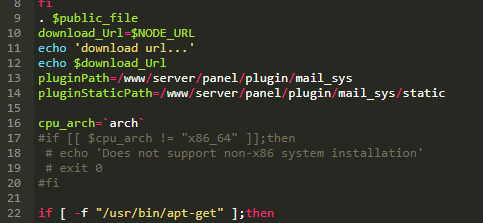
aaP_hzm170 not sure, as its not working still I may have to see if I can uncomment the lines to see if I can bypass it then this is what I have if [[ $cpu_arch != "x86_64" ]];then now I change it into as if [[ $cpu_arch != " != to ==" ]];then?
aaP_urbanbmobility Tosko Thank you for your candid reply I followed your steps like this and the outcome is as below ubuntu@129:~$ sudo su root@129:/home/ubuntu# cd /www/server/panel/install root@129:/www/server/panel/install# bash mail_sys.sh selecting download node... download url... https://node.aapanel.com root@129:/www/server/panel/install# Any heads where i may be missing something?
aaP_hzm170 aaP_urbanbmobility nope sorry, I was away for a bit, but noting works on my end -- I think the way it is the arm64 on OCI is blocked I'm going to try to see if they have a port bypass and see if it can install then I will find a way somehow 😃
aaP_urbanbmobility I am still waiting for anyone who may be kind enough to help out on this or rather for aapanel to support arm based procesor, coz at this moment so many people are either switching or suffering because of this
aaP_urbanbmobility Hope you are successful. please post here if you find a solution..will update too if i find workaround
r00tpt Hi all. I'm new here but i'm in development to fix some issues with arm support. To get around this just: Try to install MailServer once. It will error Install Redis from App Store and Set password on redis settings SSH into machine Run sudo nano /www/server/panel/install/mail_sys.sh Edit Line 17 to: if [[ $cpu_arch == "x86_64" ]];then Save file Run: sudo chmod a+x /www/server/panel/install/mail_sys.sh Run: sudo sh /www/server/panel/install/mail_sys.sh install Run install on MailServer Settings. After this mailserver should be installed and running. If you try to update it wont work because the script will update. Test and let me know if theres any problems.
aaP_urbanbmobility Thanks r00tp I had to install ubuntu 22.04, incidentaly mailserver works but some plugins wont update like mondo db's latest update is not compatible with this version. Overall my mailserver is currently up and running on Ubuntu server 22.04 Oracle ARM64 instance 4/24 gb
poida97 Thanks for these efforts to make the mailserver install via workaround. It would be great if ARM support was officially supported, as there are many of us now using Oracle's free tier 4/24 free tier which only utilizes the ARM cpu.
aaP_pfalzgraf_gyula Please update the settings of the Mail Server to the ARM support mentioned above.
aaP_pabitra I just commented out the lines as shown in the attachment and it got installed without any issue .
aaP_pfalzgraf_gyula Months have passed, but even since then, the installation of the mail server has not been reached. ARM support
DaveM I was able to get it installed on Oracle OS on ARM doing the following, as suggested above. 1.) Initiate an install of Mail Sever 2.) In a terminal, just after initiating run the following command: sudo sed -i 's/$cpu_arch !=/$cpu_arch ==/g' /www/server/panel/install/mail_sys.sh 3.) Check the install progress. If it failed before the command was run, try again and good luck!