Hi,
Please fix the extension php 7.4 where error when install other extension while using Nginx Latest Version
the error like this
Libraries have been installed in:
/www/server/panel/install/imagick-3.4.4/modules
If you ever happen to want to link against installed libraries
in a given directory, LIBDIR, you must either use libtool, and
specify the full pathname of the library, or use the `-LLIBDIR'
flag during linking and do at least one of the following:
- add LIBDIR to the `LD_LIBRARY_PATH' environment variable
during execution
- add LIBDIR to the `LD_RUN_PATH' environment variable
during linking
- use the `-Wl,--rpath -Wl,LIBDIR' linker flag
- have your system administrator add LIBDIR to `/etc/ld.so.conf'
See any operating system documentation about shared libraries for
more information, such as the ld(1) and ld.so(8) manual pages.
----------------------------------------------------------------------
Build complete.
Don't forget to run 'make test'.
/bin/sh: line 1: /www/server/panel/install/imagick-3.4.4/build/shtool: Permission denied
make: *** [Makefile:86: install-modules] Error 126
error
|-Successify ---Script execution completed---
hope @aapanel_power and @aaPanel_Jose can help for this..
According install extension for WordPress
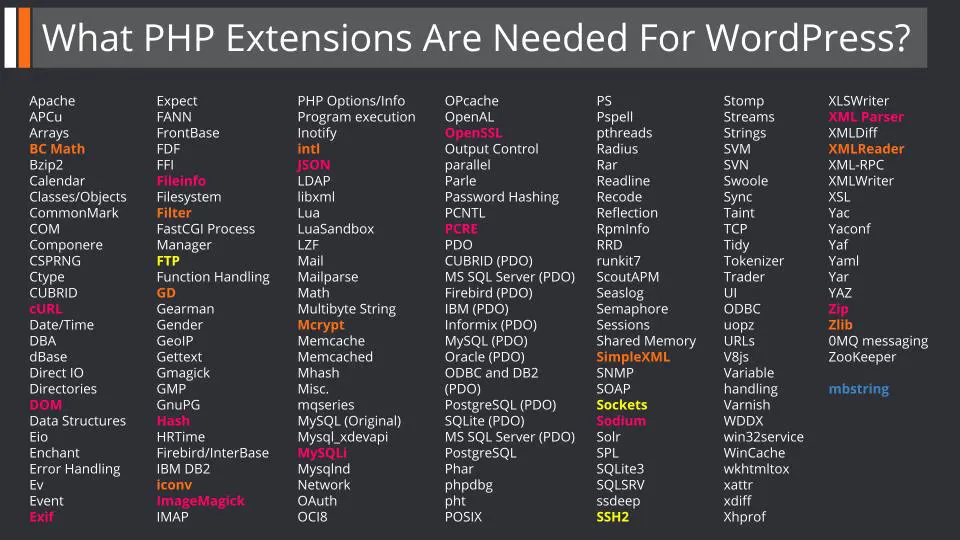
According to the WordPress handbook, WordPress needs:
13 official PHP extensions for core functionality (pink)
9 official PHP extensions for fallback functions (orange)
3 official PHP extensions if files are non-writable on the server (yellow)
1 non-official PHP extension (blue)
thanks
