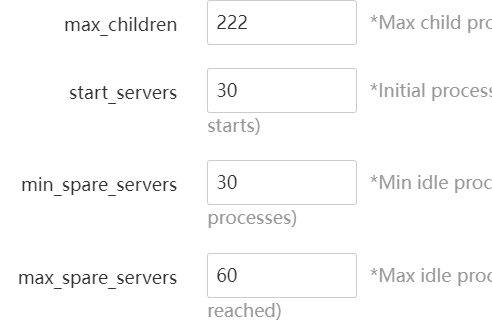
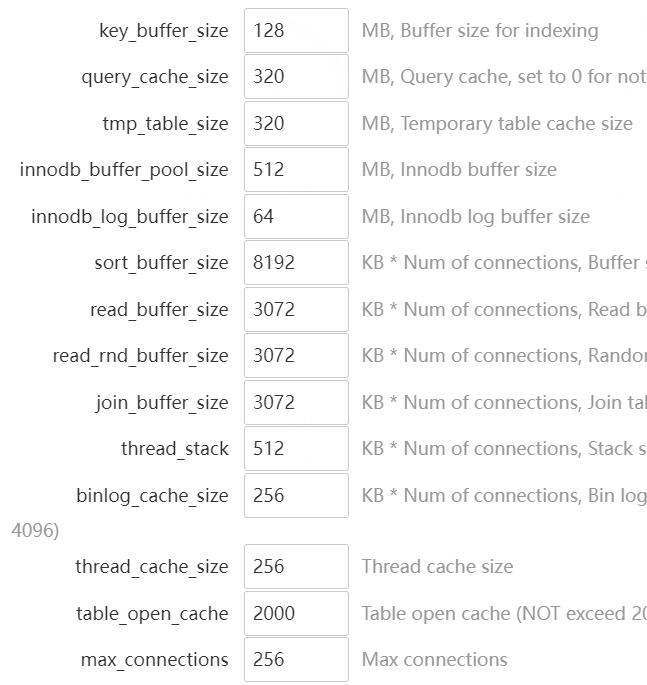
idflorin aaP_metin2tugaz yahooo, another one "CentOS 7.1+ (Ubuntu20, Debian10), to ensure that it is a clean operating system, there is no other environment with Apache/Nginx/PHP/MySQL installed (the existing environment can not be installed)" Install apc. Use redis or apcu (I prefer apcu) did you forget about URL rewrite? php parameters above are too small. I use: on 8 GB vps. and for Maria DB 10.5 but on a Centos 7 VPS
aaP_metin2tugaz idflorin Thanks for your help. I tried your configurations, but seems the same thing. I'm using MYSQL 8, Redis and I don't forget URL Rewrite, btw. 🙂
idflorin aaP_metin2tugaz btw, my opcache settings opcache.enable = 1 opcache.memory_consumption=256 opcache.interned_strings_buffer=32 opcache.max_accelerated_files=80000 opcache.revalidate_freq=7200 opcache.fast_shutdown=1 opcache.enable_cli=1 opcache.jit_buffer_size=256m opcache.jit=1205
aaP_metin2tugaz idflorin Still not working. I don't know what to do more, maybe I migrate again to cyberpanel :/
idflorin aaP_metin2tugaz the only thing that remains is to switch to PHP8.0. When I switched my sites I saw a 10-15 improvement. Btw, my sites are non-WordPress 😁 .
aaP_metin2tugaz idflorin It would be an option, but I have one plugin isn't yet compatibly with php8... But yeah, thanks a lot for your help! 🙂
aaP_metin2tugaz idflorin Btw, I try to restart php-pm but it gives me follow error: php-fpm.service not found, this is normal?
idflorin aaP_metin2tugaz no its not. on Centos 7 you could run sudo yum check-update uname -mrs sudo yum update This is the first thing I do before installing aapanel
idflorin aaP_metin2tugaz on your VPS is advisable to make a snapshot before making major changes, like system update
aaP_metin2tugaz I found php-fpm it wasn't working. I needed to remove the /tmp/ socket file from php-fpm to be able to active php-fpm. Now, although it's slowly to accept offers, now it doesn't give 502 bad gateway. Thx everyone for helping me!