http://www.animalitos-pro.com/
My problem is the following:
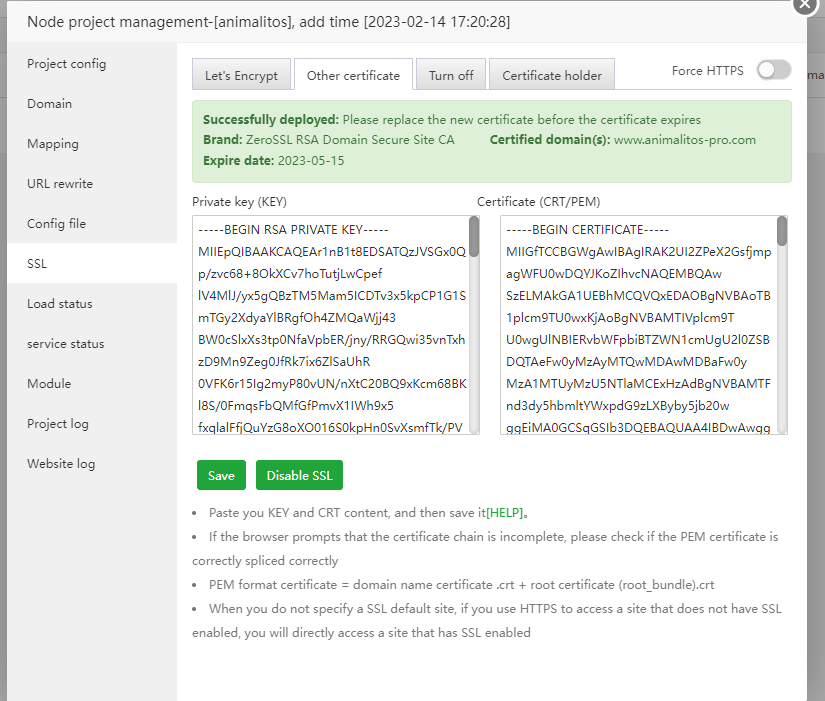
I try to correctly configure the ssl certificate to my website but it cannot be seen
I am using a tunnel to show my domain and without https it works correctly..
code app.js
var express = require("express");
var app = express();
app.set('view engine', 'ejs');
var routes = require("./routes");
var path = require("path");
app.use(express.static(path.join(__dirname, 'public')));
app.use(express.static(path.join(__dirname, '.well-known')));
app.get("/", routes.home);
app.get("/star_wars_episode/:episode_number?", routes.movie_single);
app.get("*", routes.notFound);
app.listen(process.env.PORT || 3000);
/*End */
/Nginx Config/
user www www;
worker_processes auto;
error_log /www/wwwlogs/nginx_error.log crit;
pid /www/server/nginx/logs/nginx.pid;
worker_rlimit_nofile 51200;
stream {
log_format tcp_format '$time_local|$remote_addr|$protocol|$status|$bytes_sent|$bytes_received|$session_time|$upstream_addr|$upstream_bytes_sent|$upstream_bytes_received|$upstream_connect_time';
access_log /www/wwwlogs/tcp-access.log tcp_format;
error_log /www/wwwlogs/tcp-error.log;
include /www/server/panel/vhost/nginx/tcp/*.conf;
}
events
{
use epoll;
worker_connections 51200;
multi_accept on;
}
http
{
#AAPANEL_FASTCGI_CONF_BEGIN
fastcgi_cache_key "$scheme$request_method$host$request_uri";
fastcgi_cache_path /dev/shm/nginx-cache/wp levels=1:2 keys_zone=WORDPRESS:100m inactive=60m max_size=1g;
fastcgi_cache_use_stale error timeout invalid_header http_500;
fastcgi_ignore_headers Cache-Control Expires Set-Cookie;
#AAPANEL_FASTCGI_CONF_END
include mime.types;
#include luawaf.conf;
include proxy.conf;
default_type application/octet-stream;
server_names_hash_bucket_size 512;
client_header_buffer_size 32k;
large_client_header_buffers 4 32k;
client_max_body_size 50m;
sendfile on;
tcp_nopush on;
keepalive_timeout 60;
tcp_nodelay on;
fastcgi_connect_timeout 300;
fastcgi_send_timeout 300;
fastcgi_read_timeout 300;
fastcgi_buffer_size 64k;
fastcgi_buffers 4 64k;
fastcgi_busy_buffers_size 128k;
fastcgi_temp_file_write_size 256k;
fastcgi_intercept_errors on;
gzip on;
gzip_min_length 1k;
gzip_buffers 4 16k;
gzip_http_version 1.1;
gzip_comp_level 2;
gzip_types text/plain application/javascript application/x-javascript text/javascript text/css application/xml;
gzip_vary on;
gzip_proxied expired no-cache no-store private auth;
gzip_disable "MSIE [1-6]\.";
limit_conn_zone $binary_remote_addr zone=perip:10m;
limit_conn_zone $server_name zone=perserver:10m;
server_tokens off;
access_log off;
server {
location / {
proxy_pass http://localhost:3000;
proxy_http_version 1.1;
proxy_set_header Upgrade $http_upgrade;
proxy_set_header Connection 'upgrade';
proxy_set_header Host $host;
proxy_cache_bypass $http_upgrade;
}
}
server
{
listen 888;
server_name phpmyadmin;
index index.html index.htm index.php;
root /www/server/phpmyadmin;
location ~ /tmp/ {
return 403;
}
#error_page 404 /404.html;
include enable-php.conf;
location ~ .*\.(gif|jpg|jpeg|png|bmp|swf)$
{
expires 30d;
}
location ~ .*\.(js|css)?$
{
expires 12h;
}
location ~ /\.
{
deny all;
}
access_log /www/wwwlogs/access.log;
}
include /www/server/panel/vhost/nginx/*.conf;
}
/End File/
/Web Config File/
server
{
listen 80;
listen 443 ssl http2;
server_name www.animalitos-pro.com;
index index.php index.html index.htm default.htm default.html;
# root /www/wwwroot/www.animalitos-pro.com;
#SSL-START SSL related configuration
#error_page 404/404.html;
ssl_certificate /www/server/panel/vhost/cert/animalitos/fullchain.pem;
ssl_certificate_key /www/server/panel/vhost/cert/animalitos/privkey.pem;
ssl_protocols TLSv1.1 TLSv1.2 TLSv1.3;
ssl_ciphers EECDH+CHACHA20:EECDH+CHACHA20-draft:EECDH+AES128:RSA+AES128:EECDH+AES256:RSA+AES256:EECDH+3DES:RSA+3DES:!MD5;
ssl_prefer_server_ciphers on;
ssl_session_cache shared:SSL:10m;
ssl_session_timeout 10m;
add_header Strict-Transport-Security "max-age=31536000";
error_page 497 https://$host$request_uri;
#SSL-END
#ERROR-PAGE-START Error page related configuration
#error_page 404 /404.html;
#error_page 502 /502.html;
#ERROR-PAGE-END
#REWRITE-START Pseudo-static related configuration
include /www/server/panel/vhost/rewrite/node_animalitos.conf;
#REWRITE-END
#Files or directories forbidden to access
location ~ ^/(\.user.ini|\.htaccess|\.git|\.svn|\.project|LICENSE|README.md|package.json|package-lock.json|\.env|node_modules) {
return 404;
}
#One-click application for SSL certificate verification directory related settings
location /.well-known/ {
root /www/wwwroot/www.animalitos-pro.com;
}
# HTTP reverse proxy related settings begin >>>
location ~ /purge(/.*) {
proxy_cache_purge cache_one $host$request_uri$is_args$args;
}
location / {
proxy_pass http://127.0.0.1:3000;
proxy_set_header Host $host;
proxy_set_header X-Real-IP $remote_addr;
proxy_set_header X-Forwarded-For $proxy_add_x_forwarded_for;
proxy_set_header REMOTE-HOST $remote_addr;
add_header X-Cache $upstream_cache_status;
proxy_connect_timeout 30s;
proxy_read_timeout 86400s;
proxy_send_timeout 30s;
proxy_http_version 1.1;
proxy_set_header Upgrade $http_upgrade;
proxy_set_header Connection "upgrade";
}
# End of HTTP reverse proxy related settings <<<
access_log /www/wwwlogs/animalitos.log;
error_log /www/wwwlogs/animalitos.error.log;
}
I have my ssl certificate files in the corresponding paths...
I have enabled the ports to be able to see my website,using the following commands:
firewall-cmd --permanent --add-service=http
firewall-cmd --permanent --add-service=https
firewall-cmd --list-services --zone=public
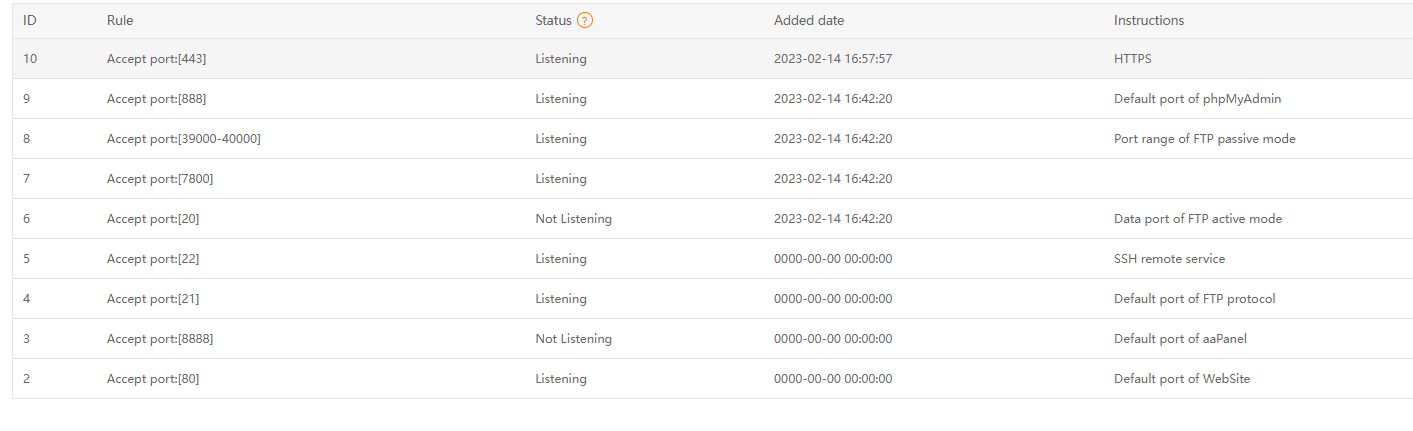
https://www.aapanel.com/forum/assets/files/2023-02-14/1676415451-955485-image.png
What exactly is the problem?
