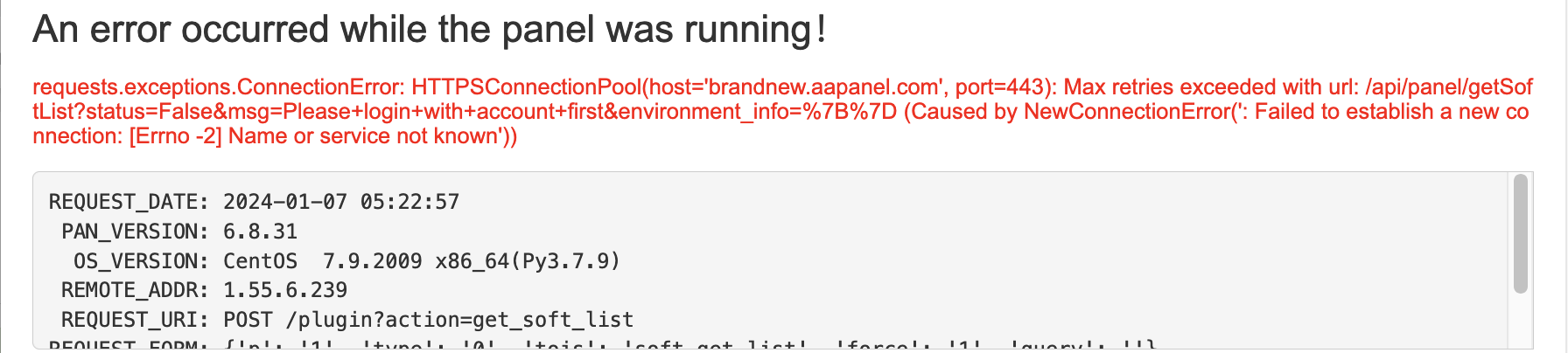
aaP_mailkevin The official install from AAPANEL site isn't working, had to use https://github.com/WebManagerSSH/aaPanel Anny workaround for this?
jxng aaP_mailkevin I strongly do not recommend using mods of aaPanel, since they can be harmful for your servers, even being open source (like having some deprecated function that's exploitable) A fix for the aaPanel error is available on my thread and it's proven to be working Peace!
aaP_mailkevin I believe your fix is for an already existing installation? The installation from official aapanel is offline
jxng aaP_mailkevin this fix also works for installation, because the brandnew subdomain is used on the install script
aaP_mailkevin jxng Still no luck - even tried re-installing the OS (CentOS) I could be wrong but kindly confirm by trying an installation if you can & tell me if it's working on your end? The official Aapanel : https://www.aapanel.com/new/download.html
aaP_mbk_temp for installation just change http:// to https:// ( on the installation link on installation help page) but after that in the panel we cant install plugins from store or startup wizard !
mrlucapaul aaP_mailkevin you need to use - https - | with http it won`t work like this : wget -O install.sh https://www.aapanel.com/script/install-ubuntu_6.0_en.sh && sudo bash install.sh aapanel
gutodiasdev I couldn't even download the necessary shells from "wget -O install.sh http://www.aapanel.com/script/install-ubuntu_6.0_en.sh && sudo bash install.sh". Dowloaded direct from: http://www.aapanel.com/script/install-ubuntu_6.0_en.sh and downloaded from here: https://github.com/aaPanel/aaPanel/blob/master/install.sh. Sent install-ubuntu-_6.0.en.sh and install.sh with filezilla directly to the server and executed: sudo bash install.sh After this, other problems comes in. Hahaha! Your solutions dissapeared with the error but other still running. One day aapanel will work! Let's stack solutions threads! Hahaha
aaP_mbk_temp for installation just change http:// to https:// ( on the installation link on installation help page) but after that in the panel we cant install plugins from store or startup wizard ! correct link : wget -O install.sh https://www.aapanel.com/script/install-ubuntu_6.0_en.sh && sudo bash install.sh aapanel