We are facing critical issues with the AWS S3 addon following an update from aaPanel version 7.0.21 to 7.0.21
Issues Observed:
Path Backup to AWS S3 Stopped Working Post-Update
The scheduled path backup to AWS S3 stopped functioning on the same day the panel was updated. We had to manually recreate the cron job to resume backups.
Backup File Location and Naming Malfunction
The backup no longer respects the target path (bucket/folder) configured in the addon settings.
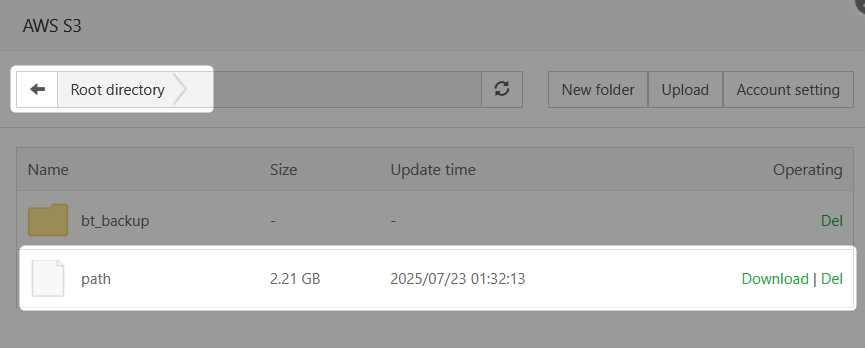
Instead of saving in the specified path, the backup is saved in the root of the S3 bucket.
Additionally, the backup file is always saved with the name "path", without any timestamp or original filename.
This causes each new backup to overwrite the previous one, resulting in only one backup being retained at any given time.
Scope of the Issue:
- The issue is reproducible on 2 out of 3 servers running aaPanel.
- We have tested both version 1.5 and 2.0 of the AWS S3 addon, and the problem persists across both versions.
Please let us know:
- If this issue is acknowledged or reproducible on your end.
- Whether a patch or update is planned to restore the correct behavior.
- Any temporary workaround to ensure backups are saved to the correct path with unique filenames.
Looking forward to your assistance.
