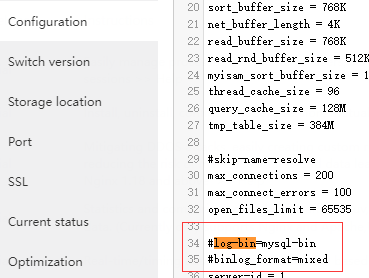
aaPanel_Kern Fornari Hello, from the picture you posted, the Binary log is closed. You can check if the configuration file has log-bin and binlog_format enabled for comments As shown
aaP_himepo5399 aaPanel_Kern I have the same problem, turned everything on, rebooted, but the logs are still saved
aaP_himepo5399 aaPanel_Kern Yes. Reboot does not solve the problem So, too, binary logs are not disabled
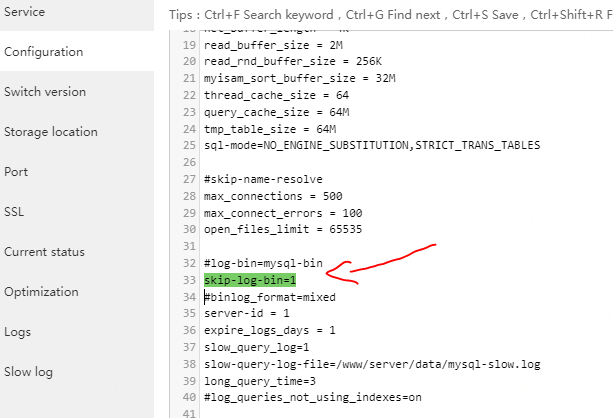
aaPanel_Kern aaP_himepo5399 Hello, try to add skip-log-bin=1 in the configuration. It is also not recommended to disable mysql bin logs, which can be used for restore and incremental backup
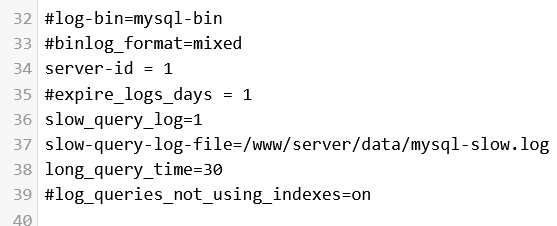
aaP_aana3027 aaPanel_Kern aaP_himepo5399 how to install "skip-log-bin=1" is this correct? i had the same problem my-sql bin generated automatically made disk enlarged
aaPanel_Kern aaP_aana3027 Hello, have you restarted mysql after modifying the configuration? What is your mysql version? This parameter is only valid for mysql8
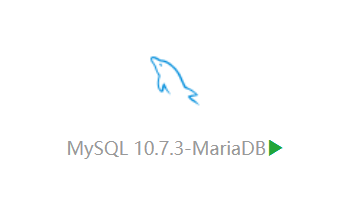
aaP_aana3027 aaPanel_Kern above command not working for my vps. log-bin is still generated automatically. my disk is very big. how do i solve it? i am using mysql 10.7.3 mariadb
aaP_aana3027 even aapanel admin can't solve this problem? lol ^_^ I think it's a bug of aapanel, the configuration is there especially the log bin problem is not working. I am no longer recommending Aapanel to my friends. soon I will also leave aapanel.