Yes, you can host a website for free in 2026. But should you? That’s a whole different story. After a dozen years in web hosting—starting on the support desk, then sysadmin, and now running my own hosting consultancy—I’ve seen thousands jump into free hosting. Some went great. Most hit a wall and wished they’d just spent five bucks a month from the start.
Here’s what I’ve learned, the real stuff—no sugarcoating.

The Truth About Truly Free Hosting Options
Free hosting usually falls into two camps:
- The old-school, ad-supported hosts (think 000webhost, InfinityFree, AwardSpace, Freehostia)
- The modern free tiers (GitHub Pages, Netlify, Vercel, Render, Cloudflare Pages)
That first bunch? They stick ads all over your site, throttle your resources, and can shut you down with zero warning. The newer group? Honestly, they’re fantastic—for the right kind of site.
When Free Hosting Actually Works (My Success Story)
A win: My own tech blog ran happily on GitHub Pages with Jekyll for four years (2019–2023). I pulled in 8,000 visitors a month, hit Google’s front page for a few keywords, and spent literally nothing.
Here’s why it worked:
- The site was static—no database, no backend headaches
- No forced ads or weird branding
- Cloudflare handled speed and security
- Simple content—just blog posts, no forms or logins
I only moved to paid hosting when I needed a membership area and a real backend.
When Free Hosting Becomes a Nightmare (Client Horror Stories)
Case in point: A client, a craft blogger, started on 000webhost. All good at first—500 visitors a month. Then a Pinterest pin blew up, and suddenly 20,000 people hit her site in one day. The host suspended her for “using too many resources.” Three days offline, lost Pinterest momentum, $250 spent, and a marathon migration. Brutal.
Another one: A student built a beautiful portfolio on InfinityFree. For a year and a half, it was great. Then the host changed the rules and slapped ugly banner ads on every page. The professional vibe was gone overnight. He had to scramble to move the site, but the first impression damage was already done.
My Personal Rule of Thumb (The One I Give Every Client)
- If it’s a hobby project, personal blog, student portfolio, or a simple static site—go free (GitHub Pages, Netlify, Vercel).
- If you’re running a business, collecting emails, working for clients, or planning to make money—pay for hosting from day one.
- If you’ve got more than 5,000 monthly visitors or you’re growing fast—you’ve already outgrown free hosting.
The real price of free isn’t dollars. It’s lost time, lost traffic, a dent in your credibility, and the headache of moving your website when you’re busiest.
Comparison Between Free and Paid Website Hosting: Cost Breakdown
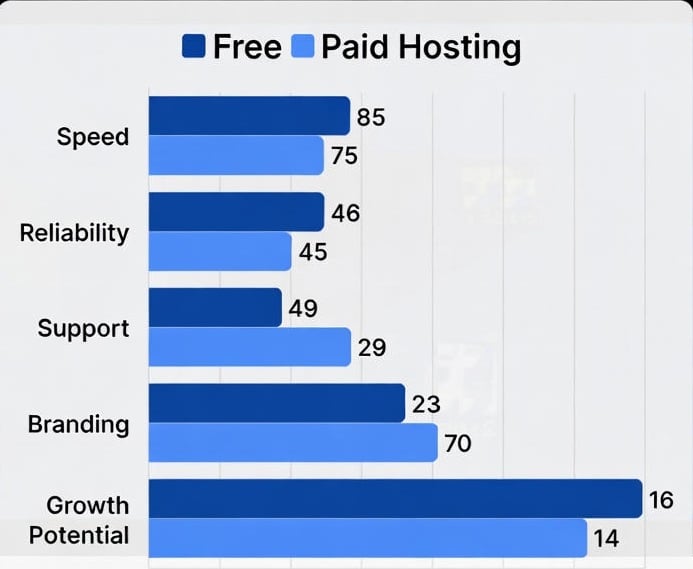
Free hosting is quite attractive, especially for a start that costs nothing. GitHub Pages, Netlify, Vercel, and Render offer great speed, CDNs all over the world, and zero mandatory ads for simple sites hosted for free. These options can’t be beat for personal websites, documentation, or experiments and can often be used for personal websites for several years straight with zero expenditures.
But paid hosting becomes absolutely necessary the instant there’s a need for reliability, for building a recognized brand, or for scaling. Even inexpensive shared hosting (ranging from $3-$10) will lift all these bottlenecks and offer genuine support. Also, the price paid for free hosting becomes clear after some time: unexpected outages, scalability issues during peak times, no business-class emailing, or compulsion to upgrade as soon as the application outgrows the free services. When there’s at least an inclination towards business or generating leads or serious traffic, paid hosting is no cost at all—it’s only an investment in the cheapest possible insurance.
Free and Paid Website Hosting Chart
The Free Options I Still Recommend in 2026

- GitHub Pages (plus Cloudflare) for static sites, portfolios, documentation
- Vercel or Netlify’s free tier for Next.js, React, or modern frontend stuff
- Render’s free plan for small side-project backends or APIs
- WordPress.com’s free subdomain—but only if you’re just playing around (upgrade fast if you’re serious, more at Managed WordPress Hosting)
Comparison Table
| Provider | Storage / Build Limits | Bandwidth | Ads on Site | Custom Domain | Best For | Major Limitations |
|---|---|---|---|---|---|---|
| GitHub Pages | Unlimited (repo size limit) | Unlimited (soft fair-use) | No | Yes (free) | Static sites, portfolios, docs, blogs (Jekyll) | Static only (no PHP/database), requires Git workflow |
| Vercel | Unlimited deploys | 100 GB/month | No | Yes (free) | Next.js, React, Vue, Svelte apps | Function execution limits, no persistent backend on free tier |
| Netlify | Unlimited builds | 100 GB/month | No | Yes (free) | JAMstack sites, Gatsby, Hugo, Eleventy | Build minutes limited (300/mo), forms limited |
| Render | 750 hours/month (services) | 100 GB/month | No | Yes (free) | Static sites + small web services (Node, Python) | Services sleep after 15 min inactivity, limited concurrent builds |
| WordPress.com Free | 1 GB storage | Unlimited (fair use) | Yes (WP ads) | No (subdomain only) | Basic blogs, personal sites | Limited plugins/themes, ads displayed, no custom code |
The Bottom Line – Be Honest With Yourself
So, can I host my website for free? Absolutely.
Will it stay free forever as you grow? Almost never.
If you’re learning or just messing around, start free. But the second your site matters—if it’s business, branding, lead collection, or real traffic—pay for real hosting. Five to fifteen bucks a month is cheap insurance for your online home.
I’ve watched too many folks waste weeks fighting with free hosts when $60 a year would’ve saved them all that pain. Don’t be one of them.
Your website is your digital home. Sometimes, a little rent is worth the peace of mind.