Let’s just say it: aaPanel takes the crown in 2026. It’s free, open-source, and lightweight, but it doesn’t cut corners. You get pro-level features, real speed, solid security, and an interface that’s actually enjoyable to use. Honestly, it beats a lot of the pricey options out there, and millions have switched for exactly that reason. If you’re running just one site or juggling hundreds, aaPanel proves you don’t have to pay a cent for top-level hosting tools.
Table of Contents
Why Your Web Hosting Control Panel Really Matters
Your control panel is the command center for your server life. The one you pick can make or break your experience—performance, security, costs, and how much of a headache you deal with every day. By 2026, free and open-source panels have closed the gap with paid ones. Sometimes, they even feel more innovative and fresh.
What Actually Counts When Comparing Panels
Here’s what people care about:
- Is the interface easy to use?
- Does it slow down your server, or keep things snappy?
- Are the features actually useful, or just bloat?
- What about security—does it help or hurt?
- Any hidden licensing fees?
- Is the community helpful when things go sideways?
Top 10 Web Hosting Control Panels for 2026
Table: Free or Paid With Pros and Cons
| Rank | Panel Name | Type | Cost | Key Strength | Main Drawback |
|---|---|---|---|---|---|
| 1 | aaPanel | Free | Completely free | Speed, modern UI, one-click apps | Premium plugins not included |
| 2 | CyberPanel | Free | Free (premium add-ons) | LiteSpeed integration | Occasional stability issues |
| 3 | HestiaCP | Free | Free | Clean design, multi-PHP | Fewer one-click apps |
| 4 | Webmin/Virtualmin | Free | Free | Deep system control | Dated interface |
| 5 | CloudPanel | Free | Free | PHP-optimized, Docker support | Limited non-PHP focus |
| 6 | cPanel | Paid | $15–$60/month | Industry standard, vast ecosystem | High cost, resource heavy |
| 7 | Plesk | Paid | $12–$50/month | Excellent Windows support | Premium pricing for full features |
| 8 | DirectAdmin | Paid | $10–$30/month | Lightweight and fast | Basic interface |
| 9 | ISPConfig | Free | Free | Multi-server capable | Steeper learning curve |
| 10 | Sentora | Free | Free | Community modules | Development slowed |
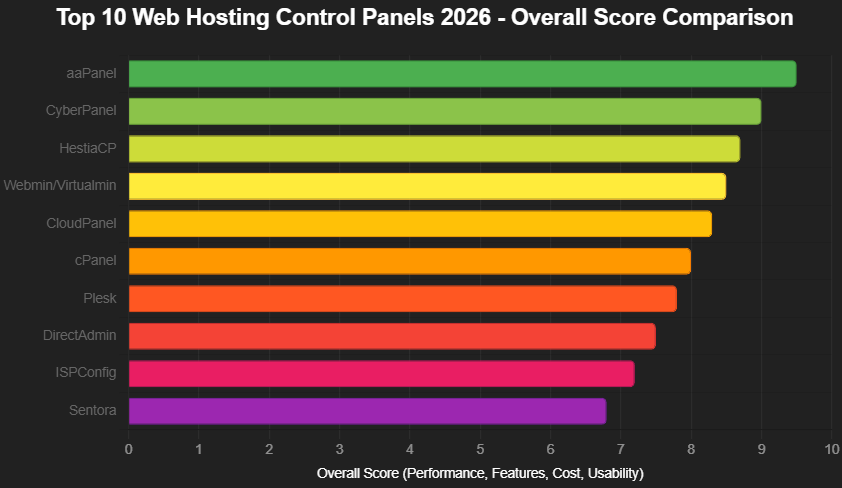
Chart – Overall Score Comparison
Here’s how the leading panels stack up in 2026:
Breaking Down the Panels
1. aaPanel

Boosted by growing global support, aaPanel’s hitting 3.6 million installs and climbing. It’s genuinely fast, looks sharp, and makes things like WordPress installs and SSL setup a breeze. Flip between Nginx and Apache with one click.
Pros: blazing performance, beautiful modern interface, one-click WordPress with optimization, free SSL, and Nginx/Apache switching.
Cons: Premium plugins cost extra (though rarely needed).
2. CyberPanel

This one’s from the LiteSpeed crew, so it’s no surprise it runs fast—especially if you care about speed and stability. You get LiteSpeed built in, a free email server, and even Rainloop webmail. It’s not perfect: newer features can be buggy, and it’s heavier on resources than aaPanel or HestiaCP.
Pros: native LiteSpeed integration for incredible speed, built-in email server, and Rainloop webmail.
Cons: occasional bugs in newer features and heavier resource usage than lighter panels.
3. HestiaCP

A modern fork of VestaCP, HestiaCP focuses on clean design and solid code. It runs smooth, gives you lots of PHP options, and is easy on your server.
Pros: excellent multi-PHP support, built-in Let’s Encrypt, and very low overhead.
Cons: fewer one-click application installers compared to aaPanel or CyberPanel.
4. Webmin/Virtualmin

This one’s old school, maybe even a legend. If you want to control every detail of your server, it’s got modules for almost anything. The interface feels stuck in the past, and it’s not the friendliest for beginners, but power users swear by it. Those considering modern replacements for Webmin/Virtualmin often turn to ISPConfig or Sentora for better reseller features while keeping the free open-source model.
Pros: extensive modules for almost any server task, multi-server management.
Cons: interface feels dated, and setup requires more technical knowledge.
5. CloudPanel

Laser-focused on PHP, CloudPanel brings Docker support and runs super light. It’s great for modern PHP frameworks, sets up Redis automatically, and doesn’t hog resources. But if you want to run non-PHP apps, look elsewhere. The community’s a bit smaller, too.
Pros: Docker integration, automatic Redis setup, and extremely lightweight.
Cons: limited support for non-PHP stacks and smaller community.
6. cPanel

cPanel’s been around for over 20 years, and it still rules the shared hosting world. Tons of plugins, rock-solid support, and a huge user base. The catch? It gets expensive fast, especially as you add more sites, and it’s not exactly a lightweight. For those seeking lighter cPanel alternatives, the switch often brings immediate speed gains without losing core functionality.
Pros: vast ecosystem, excellent support, and proven stability.
Cons: high licensing costs that increase with site count and heavier resource usage.
7. Plesk

If you’re on Windows servers, Plesk is tough to beat. It’s polished, supports Docker, has smooth Git integration, and the extension marketplace is packed. But, you’ll pay a premium for the best features, and it’s pricier than a lot of its competitors. Many users exploring Plesk alternatives find options offer similar capabilities at zero cost while maintaining cross-platform flexibility.
Pros: polished Git integration, excellent Docker support, and strong extension marketplace.
Cons: premium pricing for full feature set and higher cost than alternatives.
8. DirectAdmin

DirectAdmin keeps things light and fast. If you care about performance, you’ll like how quick the interface feels and how little it demands from your server. Simple licensing is a plus, too. The catch? The design’s a bit plain, and it doesn’t pack as many advanced features as some of its rivals. Users looking for more affordable DirectAdmin replacements frequently discover free options like aaPanel that match or exceed its speed without the monthly fees.
Pros: fast interface, low resource usage, and straightforward licensing.
Cons: more basic design and fewer advanced features than competitors.
9. ISPConfig

Built in Germany, ISPConfig shines when you need to manage a bunch of servers at once. Hosting providers love it for that. You get handy billing plugin options right out of the box. On the flip side, it takes some time to learn, so beginners might feel a bit lost at first.
Pros: excellent for managing multiple servers, built-in billing integration options.
Cons: steeper learning curve and less beginner-friendly.
10. Sentora

Sentora picks up where ZPanel left off, but with a bigger focus on modules. You get lots of active module development, which makes it great for resellers who want to tweak things their way. Downsides? Updates come slower, and the community is smaller compared to bigger names.
Pros: active module development, good for resellers wanting customization.
Cons: slower development pace and smaller user base than leading alternatives.
Real User Experiences That Matter
One agency managing 120 client sites ditched cPanel for aaPanel. They cut $600 off their monthly licensing bill, and all their sites loaded faster. The owner put it best: “The interface is so much cleaner, and one-click staging saved us countless hours.”
A developer running Laravel apps switched to CloudPanel. Memory usage dropped by 60%—and that’s not even counting the time saved with automatic Redis and OPCache set up. “That alone made the move worth it,” they said.
Stories like these keep popping up. People keep finding that modern free web hosting control panels just make daily life smoother than the old paid ones.
Looking ahead to 2026, free panels are where you’ll see real innovation. Paid options still have their place, especially for big companies that need strong support. But for most people, aaPanel stands out: fast, packed with features, and it won’t cost you a dime.