
Nginx Security Update (November 18, 2026)
On November 18, 2026, Nginx officially disclosed ten Nginx vulnerabilities fixed in 1.31.9 and 1.30.7. Five of them are grouped as nginx2root and can allow unauthenticated attackers to crash a worker process or execute code.
Summary
| Item | Details |
|---|---|
| Highest severity | Major and Medium, with additional Minor issues |
| Affected versions | Nginx 0.5.33-1.31.8, depending on the CVE |
| Fixed versions | 1.30.7, 1.31.9 |
| Main issue group | nginx2root (5 CVEs) |
| Published | 2026-11-18 |
Affected vulnerabilities
| CVE | Severity | Issue | Vulnerable versions |
|---|---|---|---|
CVE-2026-123007 | Major | Memory corruption in HTTP/2 flow control | 1.9.5-1.31.8 |
CVE-2026-118899 | Major | Infinite loop while reading a client request body over TLS 1.3 | 1.13.0-1.31.8 |
CVE-2026-113425 | Major | Use-after-free in the mail proxy module | 0.5.33-1.31.8 |
CVE-2026-123634 | Medium | Use-after-free during response processing in the resolver | 0.6.18-1.31.8 |
CVE-2026-121810 | Medium | Use-after-free in HTTP/3 | 1.25.0-1.31.8 |
CVE-2026-123633 | Medium | Use-after-free in HTTP/2 | 1.19.7-1.31.8 |
CVE-2026-120967 | Medium | SNI bypass with client certificate validation in stream | 1.25.5-1.31.8 |
CVE-2026-120993 | Minor | NULL pointer dereference with PROXY protocol version 2 | 1.31.4-1.31.8 |
CVE-2026-125283 | Minor | Buffer overflow when using alias with try_files | 0.9.6-1.31.8 |
CVE-2026-123640 | Minor | Insufficient validation in the stream ssl_preread module | 1.15.2-1.31.8 |
The nginx2root group contains CVE-2026-123007, CVE-2026-123633, CVE-2026-121810, CVE-2026-123634, and CVE-2026-113425.
Back up before upgrading
Create a server snapshot before proceeding. If snapshots are not available, back up websites, Nginx configuration, and vhost files first.
Update Nginx in aaPanel
- Open
App Store. - Click
Update App Listin the top-right corner. - Find Nginx and update it to
1.31.9or1.30.7. - Test the Nginx configuration and restart the service.
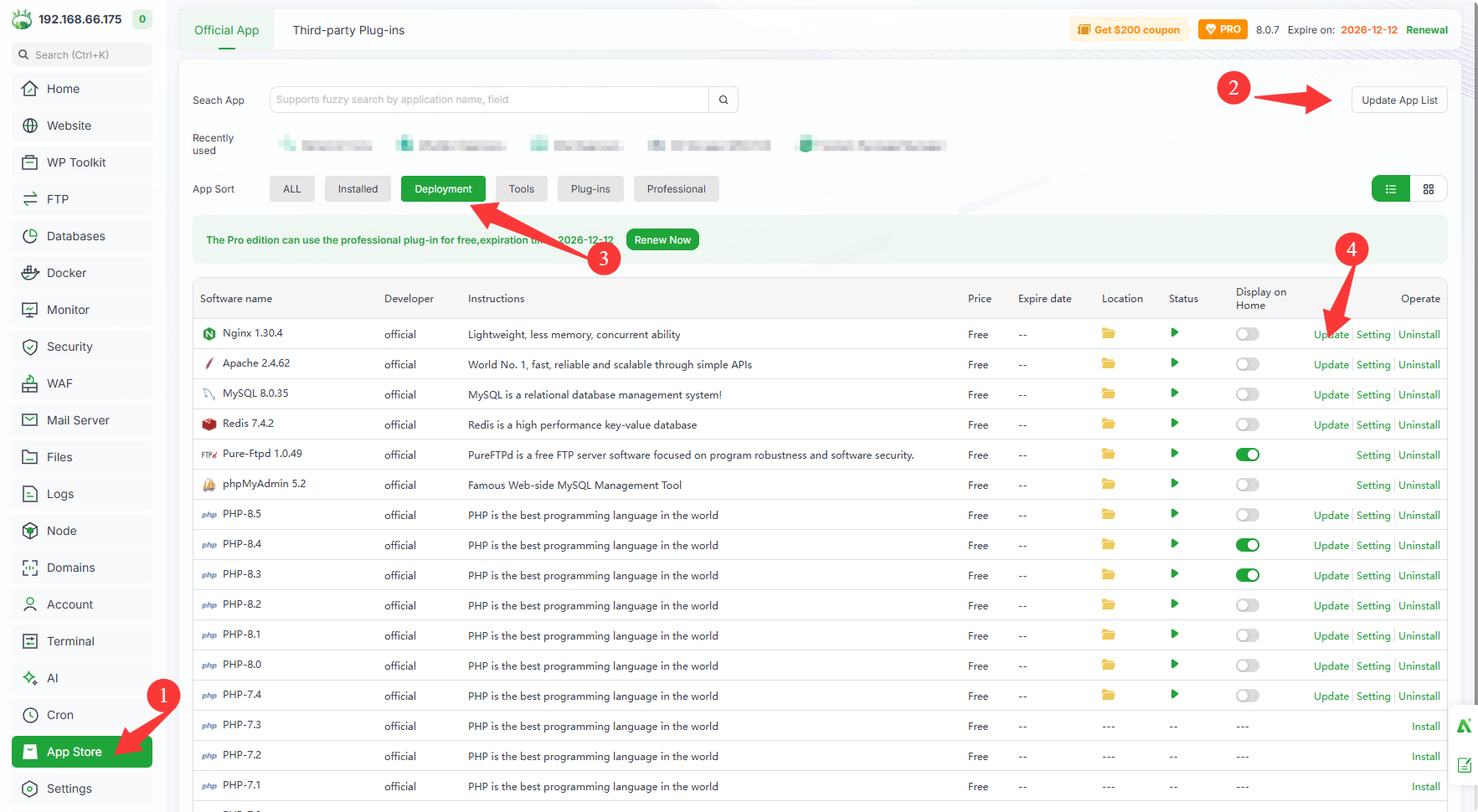
After updating, verify that websites, HTTP/2, proxy rules, and other required features still work.
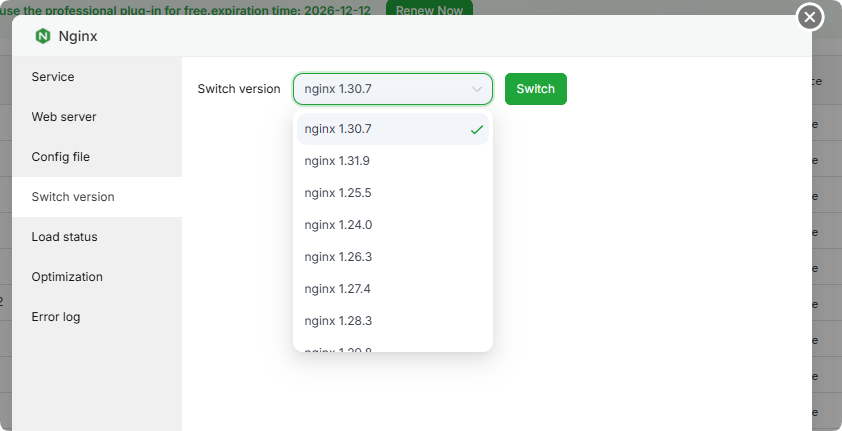
Switch Nginx version
If the version cannot be updated directly:
- Open
App Store>Nginx>Switch version. - Switch to the target version.
- Run the update again and restart Nginx.
Cannot update immediately
If patching must be delayed, disable HTTP/2 after backing up the vhost configuration:
BK=/www/backup/nginx_vhost_$(date +%F_%H%M); mkdir -p $BK
cp -a /www/server/panel/vhost/nginx/. $BK/
grep -rl "http2 on;" /www/server/panel/vhost/nginx/ | xargs -r sed -i 's/http2 on;/http2 off;/g'
/www/server/nginx/sbin/nginx -t
/etc/init.d/nginx restart
Do not keep HTTP/2 disabled as a permanent fix. Updating to 1.31.9 or 1.30.7 is the complete remediation.