
Cron
Cron can perform tasks regularly, such as:
backup website,backup database,backup directory,execute commands,automatic taskexecution, etc.
Cron Overview
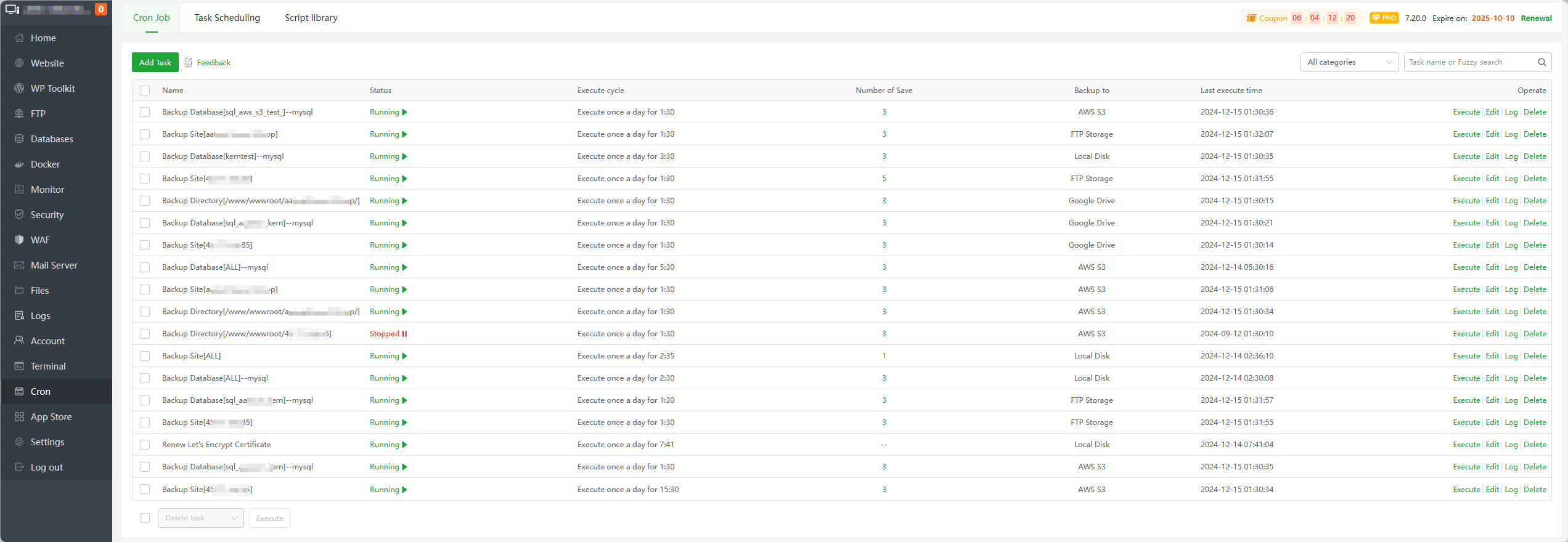
Cron Job
| Function | Describe |
|---|---|
| Add Task | Add scheduled task |
| All categories | View the specified task category |
| Name | Display scheduled task name |
| Status | The status of the task, whether Stopped or Running |
| Execute cycle | Execution cycle time support Daily,N Days,Hourly,N Hours,N Minutes,Weekly, Monthly,N Second. |
| Number of Save | Set the number of backup files to keep. If they exceed the number, they will be automatically deleted. |
| Backup to | Back up to specified storage location, supportedLocal Disk,FTP Storage,Google Drive,Google Cloud Storage,AWS S3. In addition to Local Disk, other storage locations need to be installed and configured in the APP Store. |
Last execute time | Last execution time of this task |
| Execute | Click to execution this task now |
| Edit | Edit scheduled tasks |
| Log | View the execution log in this task, can check the task execution results |
| Delete | Delete scheduled tasks |
Add Task or Edit -- Cron Job
Shell Script
Execute specified commands regularly
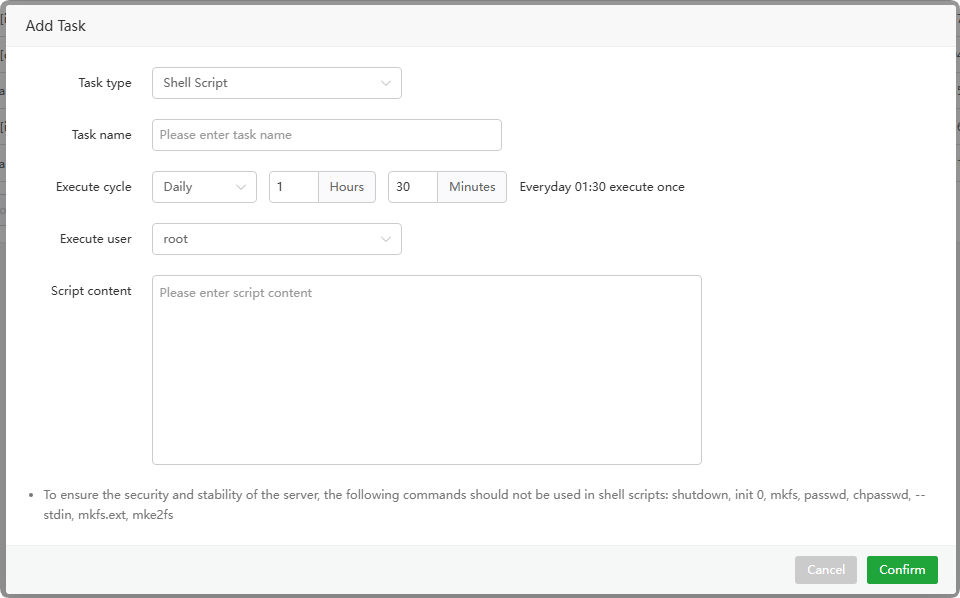
Task type : choose
Shell ScriptTask name : Enter the name of the task
Execute cycle : time support
Daily,N Days,Hourly,N Hours,N Minutes,Weekly,Monthly,N Second.Execute user : User who performs the task
Script content : Enter the command to be executed
Backup Site
Back up website regularly
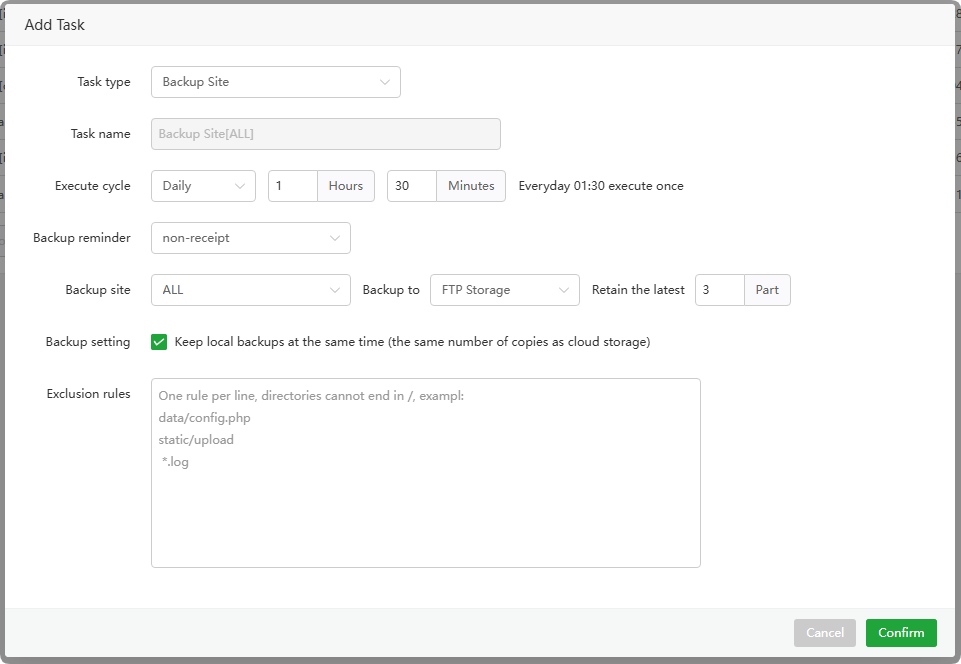
Task type : choose
Backup SiteTask name : Display the backup task name
Execute cycle : time support
Daily,N Days,Hourly,N Hours,N Minutes,Weekly,Monthly.Backup reminder : Reminder when backup fails, support
Email,Dingding,WeCom,Feishu,TelegramBackup site : Select
allorspecifiedwebsitesBackup to : Select the location where the backup files are to be stored, supported
Local Disk,FTP Storage,Google Drive,Google Cloud Storage,AWS S3.Backup setting : The backup save location is:
FTP Storage,Google Drive,Google Cloud Storage,AWS S3, Can choose to keep the backup file locally on the server.Retain the latest : Keep the
latest copies, old ones will bedeletedExclusion rules : Exclude files or directories that are not backed up.
Backup Database
Schedule backup of database, currently only supports
MySQLdatabase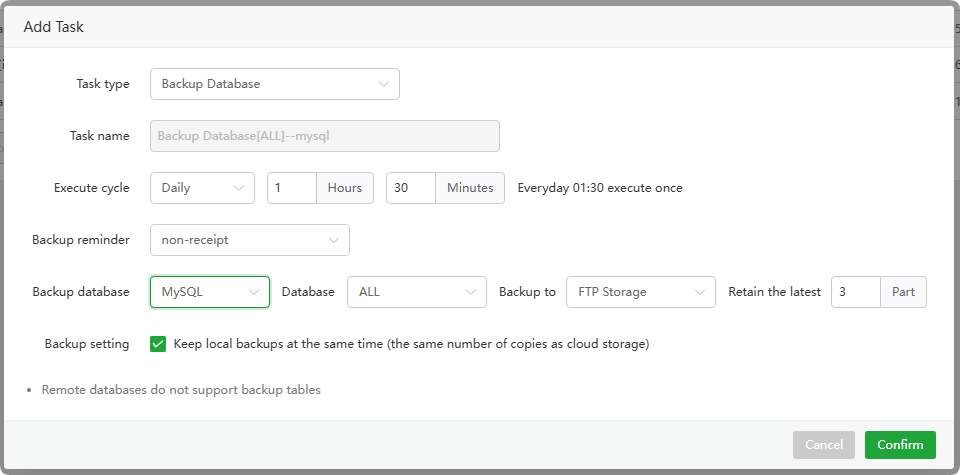
Task type : choose
Backup DatabaseTask name : Display the backup task name
Execute cycle : time support
Daily,N Days,Hourly,N Hours,N Minutes,Weekly,Monthly.Backup reminder : Reminder when backup fails, support
Email,Dingding,WeCom,Feishu,TelegramBackup database : Select the supported database type, currently only supported
MySQLdatabaseDatabase : Select
allorspecifieddatabasesBackup to : Select the location where the backup files are to be stored, supported
Local Disk,FTP Storage,Google Drive,Google Cloud Storage,AWS S3.Retain the latest : Keep the
latest copies, old ones will bedeletedBackup setting : The backup save location is:
FTP Storage,Google Drive,Google Cloud Storage,AWS S3, Can choose to keep the backup file locally on the server.
Cut Log
Regularly cut website logs
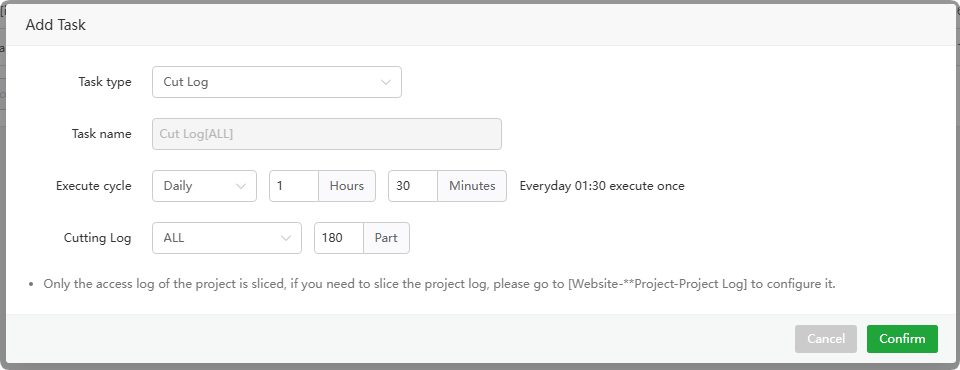
Task type : choose
Cut LogTask name : Display the cutting task name
Execute cycle : time support
Daily,N Days,Hourly,N Hours,N Minutes,Weekly,Monthly.Cutting Log : Select
allorspecifiedwebsitesPart : How many days old logs should be retained, the default is
180 days
Backup Directory
Schedule backup directory
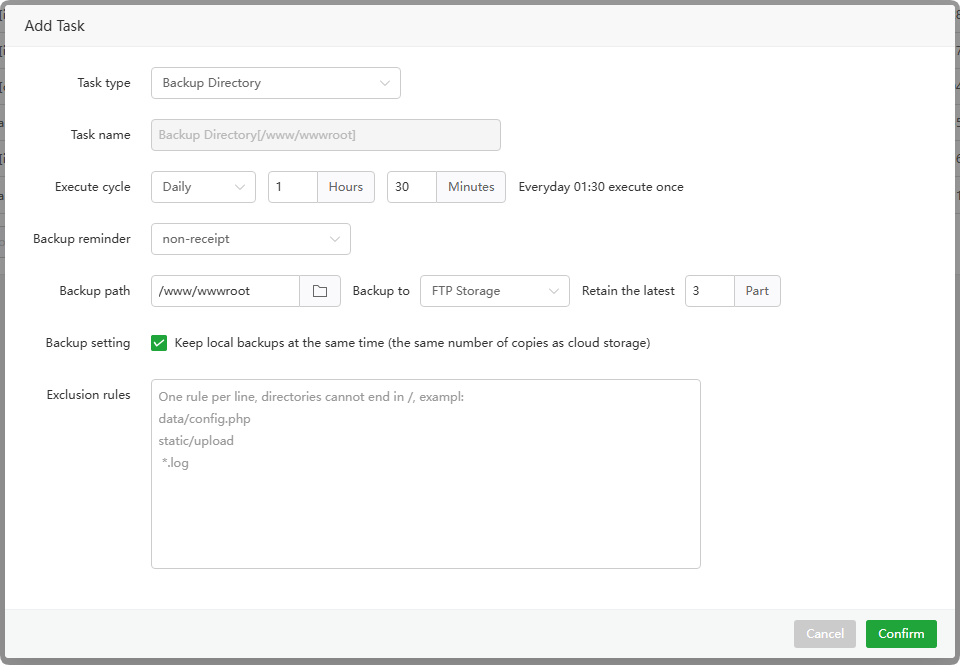
Task type : choose
Backup DirectoryTask name : Display the backup task name
Execute cycle : time support
Daily,N Days,Hourly,N Hours,N Minutes,WeeklyMonthlyBackup reminder : Reminder when backup fails, support
Email,Dingding,WeCom,Feishu,TelegramBackup path :
Select directoryto backupBackup to : Select the location where the backup files are to be stored, supported
Local Disk,FTP Storage,Google Drive,Google Cloud Storage,AWS S3.Retain the latest : Keep the
latest copies, old ones will bedeletedBackup setting : The backup save location is:
FTP Storage,Google Drive,Google Cloud Storage,AWS S3, Can choose to keep the backup file locally on the server.Exclusion rules : Exclude files or directories that are not backed up.
Sync Time
Synchronize server time
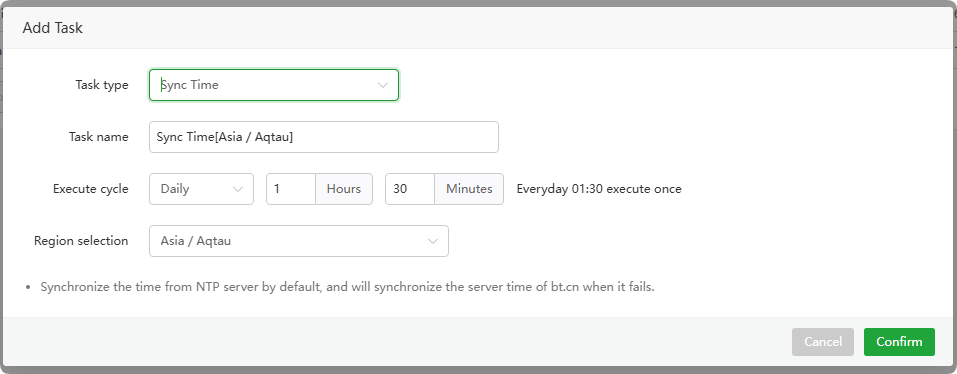
Task type : choose
Sync TimeTask name : Display task name
Execute cycle : time support
Daily,N Days,Hourly,N Hours,N Minutes,WeeklyMonthlyRegion selection : Select the region to be synchronized
Free RAM
Restart
PHP,MYSQL,PURE-FTPD,APACHE,NGINXservices regularly torelease memory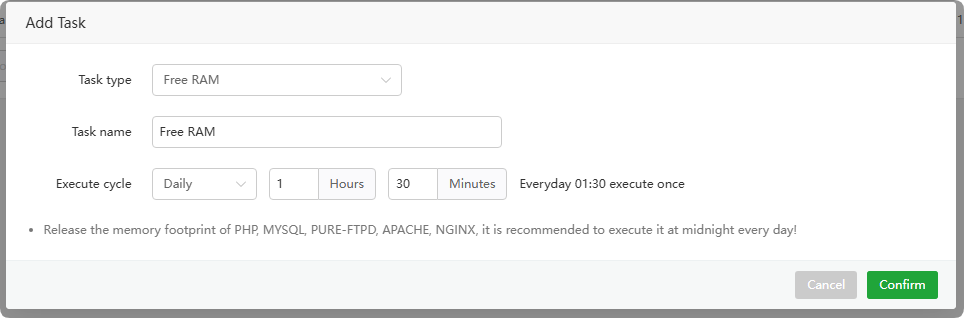
Task type : choose
Free RAMTask name : Display task name
Execute cycle : time support
Daily,N Days,Hourly,N Hours,N Minutes,WeeklyMonthly
Access URL
Visit website links regularly
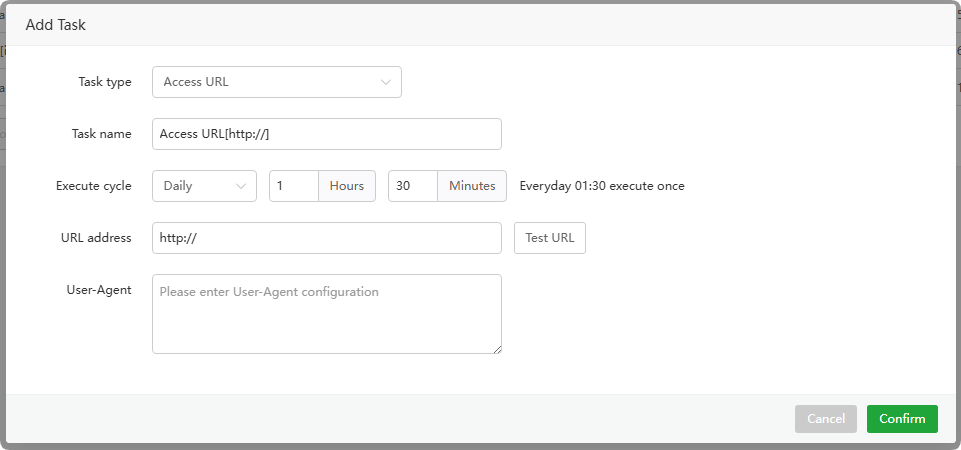
Task type : choose
Access URLTask name : Display task name
Execute cycle : time support
Daily,N Days,Hourly,N Hours,N Minutes,WeeklyMonthly,N Second.URL address : Fill in the
website linkwant to visitUser-Agent : Fill in User-Agent, can be
empty
Execution cycle
Time support Daily, N Days, Hourly, N Hours, N Minutes, Weekly, Monthly, N Second.
Daily : Executed at the specified time
every dayN Days : Executed at the specified time
every N daysHourly : Execute at the specified time
every hourN Hours : Executed at the specified time
every N hoursN Minutes : Executed at the specified time
every N minutesWeekly : Execute at specified time
every weekMonthly : Executed at the specified time
every monthN Second : Execute at the specified time
every N seconds
Log -- Cron Job
Check the scheduled task execution log and view the
execution resultsbased on the log.
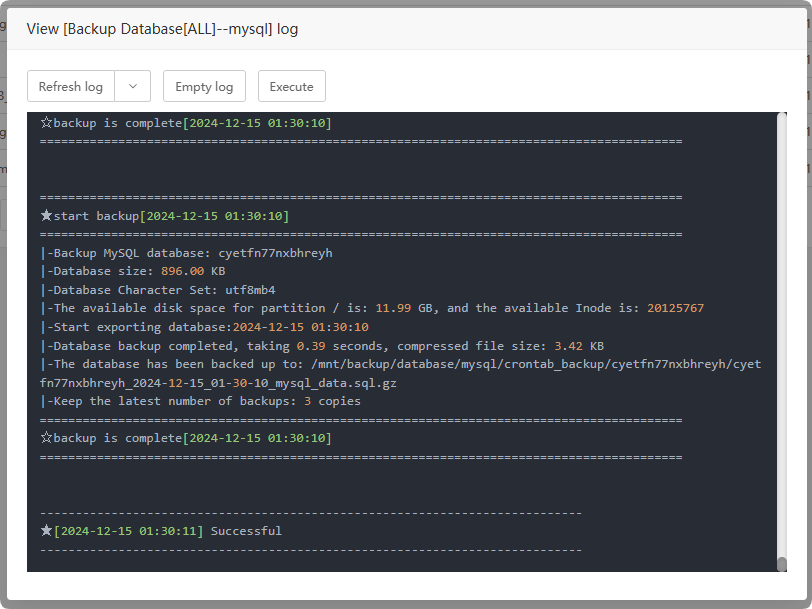
Refresh log : Get the latest log, or
refresh automaticallyEmpty log : Clear logs
Execute : Execute task immediately
Task Scheduling
Automatically execute the next task based on the results returned by the task

| Function | Describe |
|---|---|
| Add Task | Add a Task Scheduling |
| Name | Display task name |
| Execute cycle | time support Daily, N Days, Hourly, N Hours, N Minutes, Weekly Monthly |
| Remark | Task notes |
| Creation time | Task creation time |
| Last execute time | Task last execution time |
| Execute | Execute this task now |
| Event | Trigger event, match the task execution result to trigger the next task |
| Edit | Edit task |
| Log | View task logs and check task execution results |
| Delete | delete task |
Add Task or Edit -- Task Scheduling
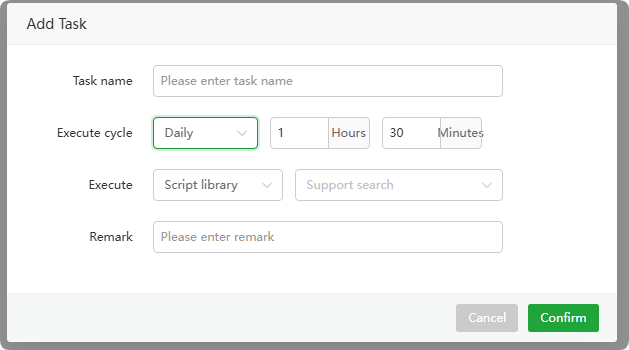
- Task name : Enter task name
- Execute cycle : time support
Daily,N Days,Hourly,N Hours,N Minutes,WeeklyMonthly - Execute : Select the
script libraryor enter thecommand content - Remark : Task notes
Event
Matching based on task results triggers the next task
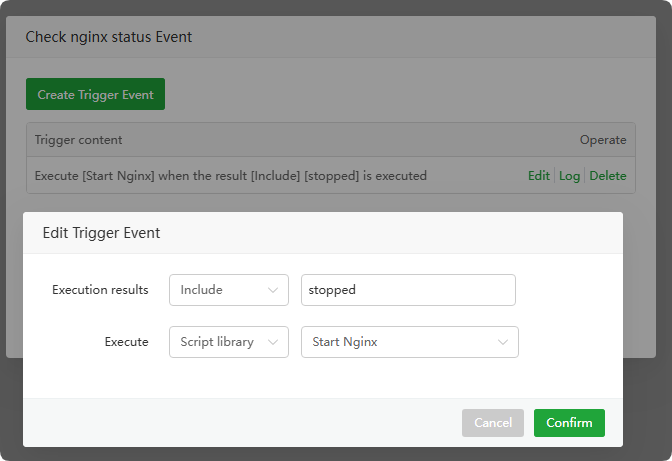
When the result is equal to
Includewhen, executeStart Nginxscript
Create Trigger Event
- Execution results: When the results of the task match the
input content, the script selected byExecuteis automatically executed. Matching options:IncludeorExcludeorEqualorUnequal - Execute: When the conditions of
*Execution resultsare met, select the script to be executed. You can add the script inScript library - The above picture explains: When the result is equal to
Includewhen, executeStart Nginxscript
Edit : Edit trigger event
Log : View the trigger event log and check the
trigger execution resultsDelete : Delete trigger event
- Execution results: When the results of the task match the
Task Scheduling example:
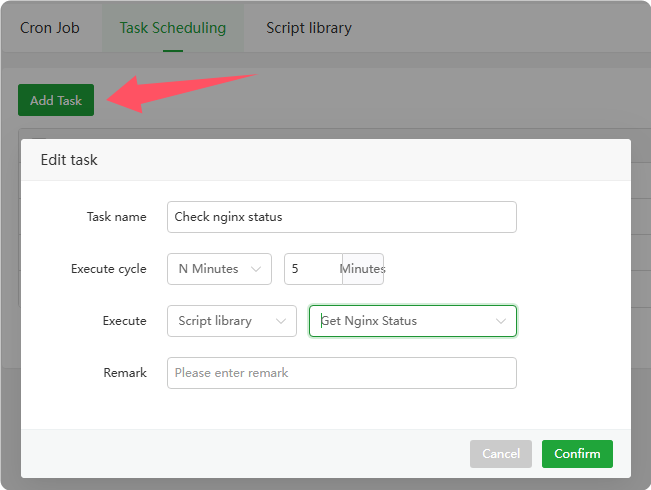
Requirement: Check whether the Nginx status is stopped every 5 minutes. If it stops, automatically trigger the start of Nginx.
Add a Task Scheduling
Task name : Check nginx status
Execute cycle : 5 minutes
Execute : Select the script library and select
Get Nginx Status, finally confirm adding
As shown in the picture:
Create trigger event
Execution results : choose
Include,enterstoppedExecute : choose
Start Nginx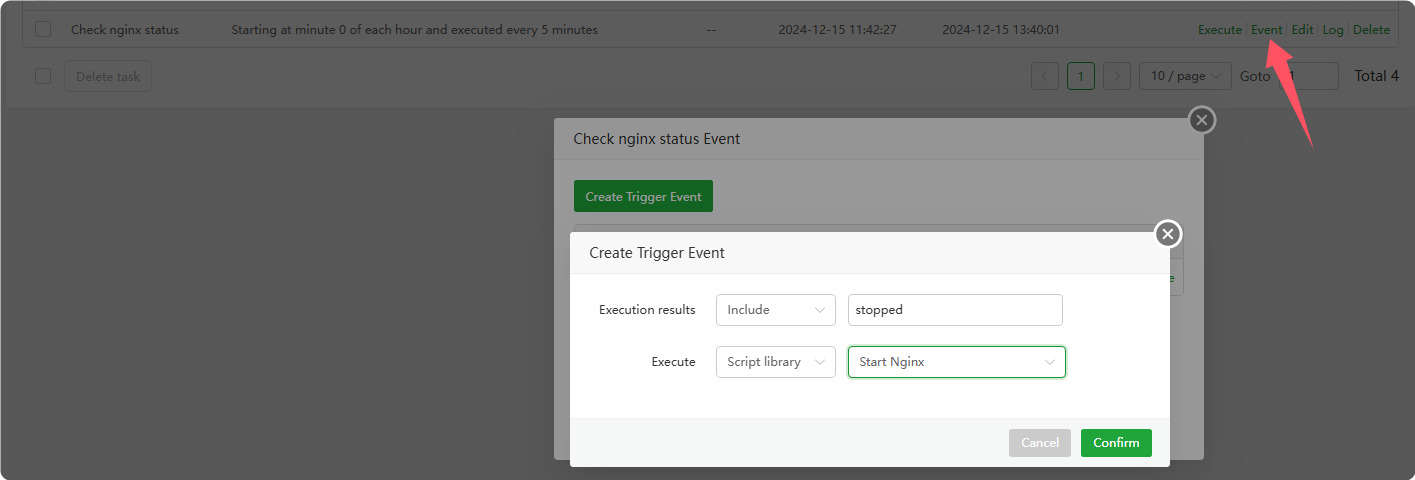
Stop Nginx for testing
Exist
APP Storein, findNginxGo to administration to stop itClick
ExecutePerform tasks and viewLog, check whether starting Nginx is successfully executed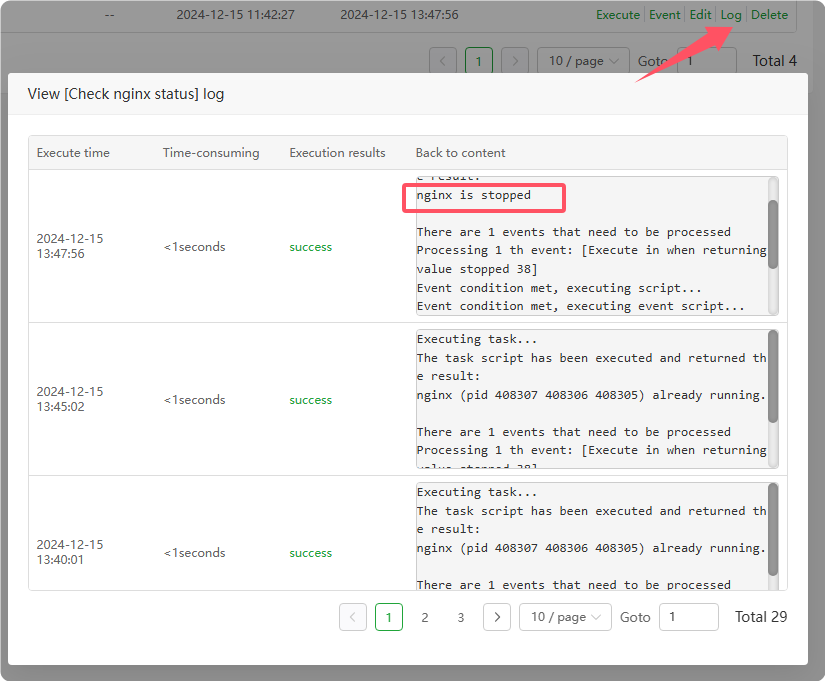
Script library
Built-in script library
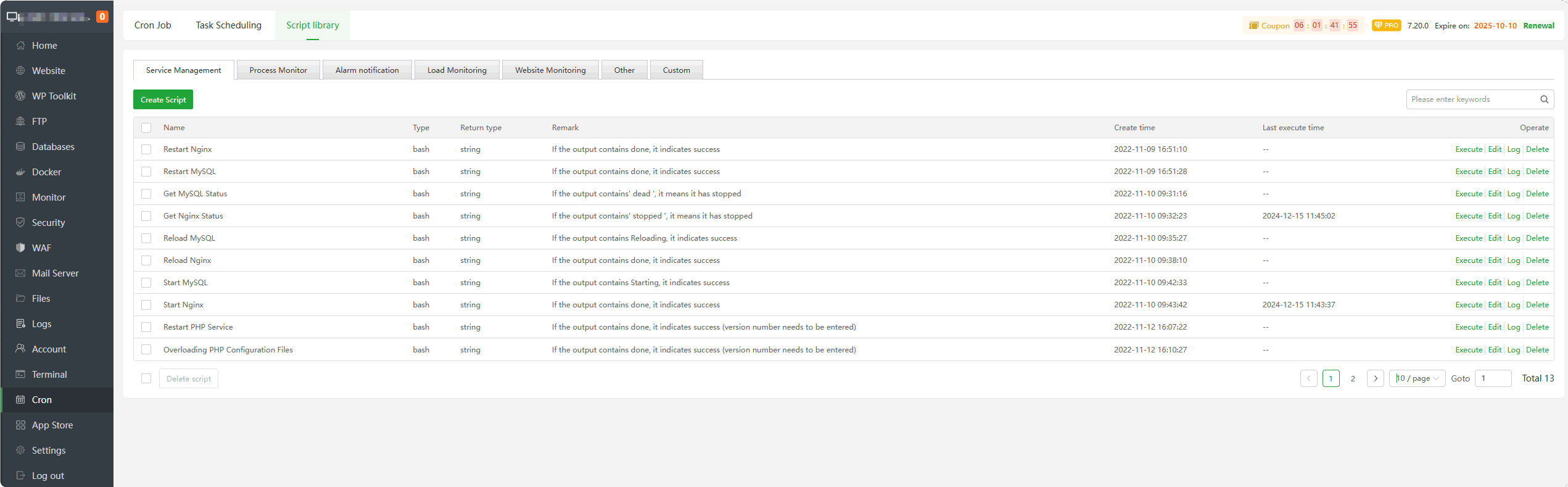
| Function | Describe |
|---|---|
| Create Script | Create a script |
| Name | Display script name |
| Type | Script type |
| Return type | Script return type: FloatorStringorInteger |
| Remark | Script notes |
| Create time | Script creation time |
| Last execute time | Last execution time of the script |
| Execute | Execute this script immediately |
| Edit | Edit script |
| Log | View logs and check script execution results |
| Delete | delete script |
Create Script
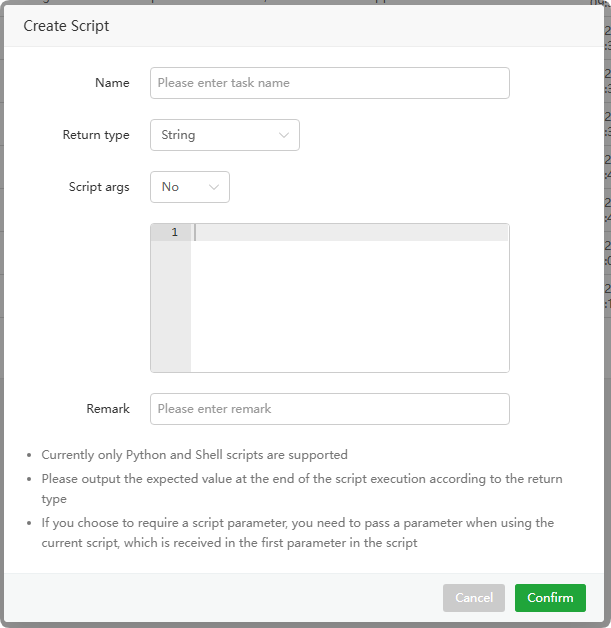
Name : Enter script name
Return type : Script return type:
FloatorStringorIntegerScript args : Whether
script parameters, prompts and instructions are requiredRemark : Script notes
Feedback or Suggestions
If you encounter problems or suggestions during use, please contact us through the following methods:
- (Please describe in
detailor providescreenshots)
Email: [email protected]
Discord: https://discord.gg/Tya5yceBpd
Telegram: https://aapanel.com/tg
GitHub: https://github.com/aapanel/aapanel
If you like aaPanel, please give it a Star