
Account
Create a new user environment, deploy the website
aaPanel Sub Account - Multiple users
- Resource quota
- Separate user area
- As simple as aaPanel
TIP
The Website, Database, PHP Mail Server and FTP in Account (Sub aaPanel) depend on the corresponding Nginx, MySQL , PHPand Pure-Ftpd Mail Server in the App Store of aaPanel, which need to be installed before they can be used.
WHMCS Management Account (Sub aaPanel)
- Sub aaPanel for sale via WHMCS: WHMS
Account
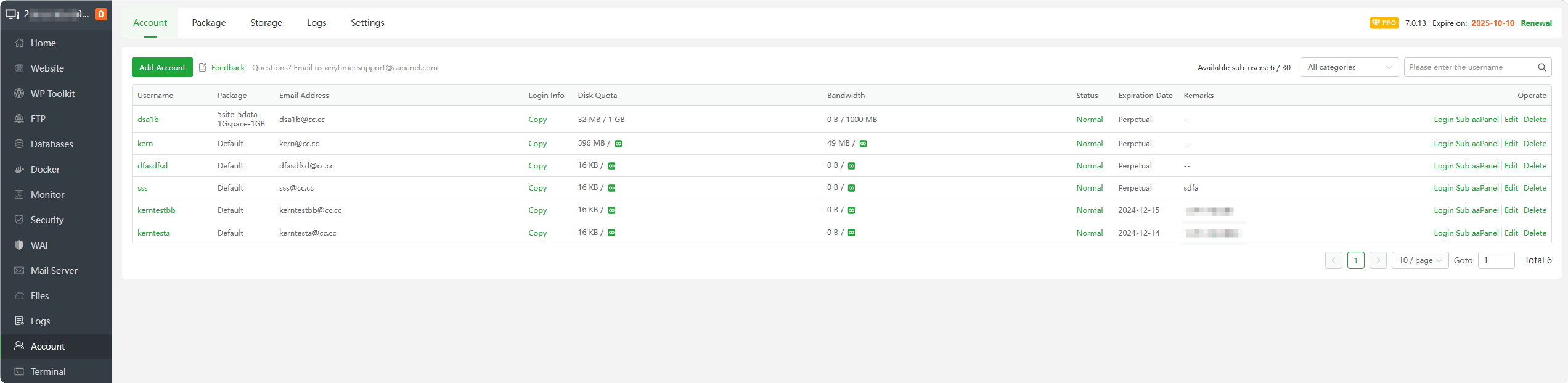
- Add Account : Add a new user
Username : Display user name, click to directly enter Sub aaPanel
Package : Display the
resource package usedby the current userEmail Address : Display the user's email address
Login Info : Click
Copytoviewthelogin informationof this userDisk Quota : Displays the
maximum available spaceandused space, where represents
 unlimitedBandwidth : Displays the
maximum available trafficand theused traffic, where represents unlimitedStatus : Displays the status of the current user and can
disableorenablethis user.Expiration Date : Display the expiration time of this user
Remarks : Display user’s remarks
Login Sub aaPanel : Click to enter this user's Sub aaPanel
Edit : Modify this user's
expiration time,email address, resourcepackage, etc.Delete : Delete this user.
Note: that this user's data will also be deleted. Please operate with caution.
Add Account
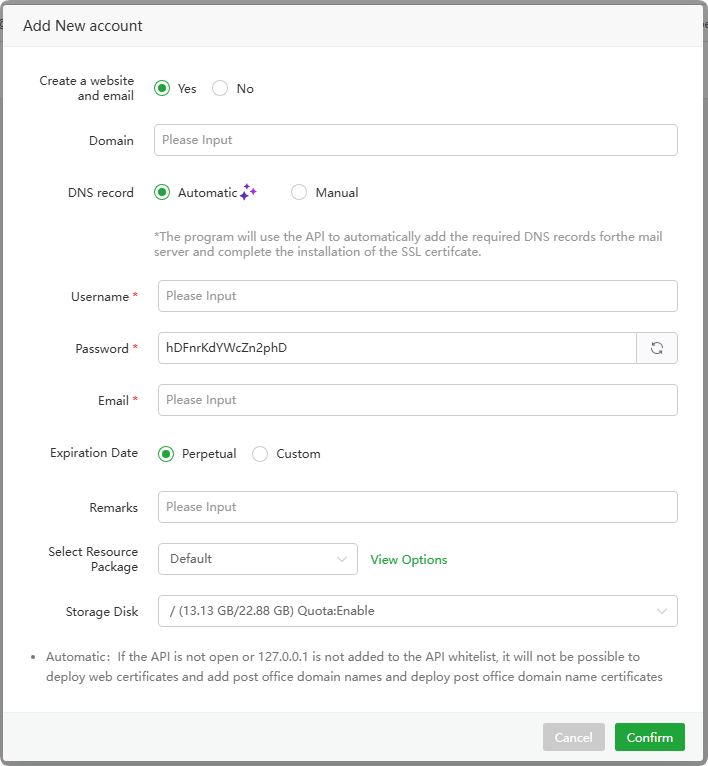
Create a website and email: Choose Yes or No, Automatically creates a website and email domain during Account creation. Note: Cannot create if website and email domain already exist. Requires enabling
APIin Settings first and addIP whitelist: 127.0.0.1Domain : Enter a
domain name. If the domain name already exists, it cannot be created.DNS record : Choose
ManualorAutomatic. Note thatAutomatic Add Recordrequires adding the corresponding DNS API in Domains and having a validSSL certificatefor the domain to functionUsername : Enter a username
Password : Automatically generated password, click to change
Email : Enter the user’s
email addressExpiration Date : Select the expiration time of this user, the default is
permanentRemarks : Enter user’s remarks
Select Resource Package : Select this user’s resource package, click
View OptionsView resource package informationStorage Disk : Select the partition where this
user's data is stored
Package
Package is used to manage user resources, including the
number of websites,number of databases,number of PHP sub-processes,monthly bandwidth, anddisk space.
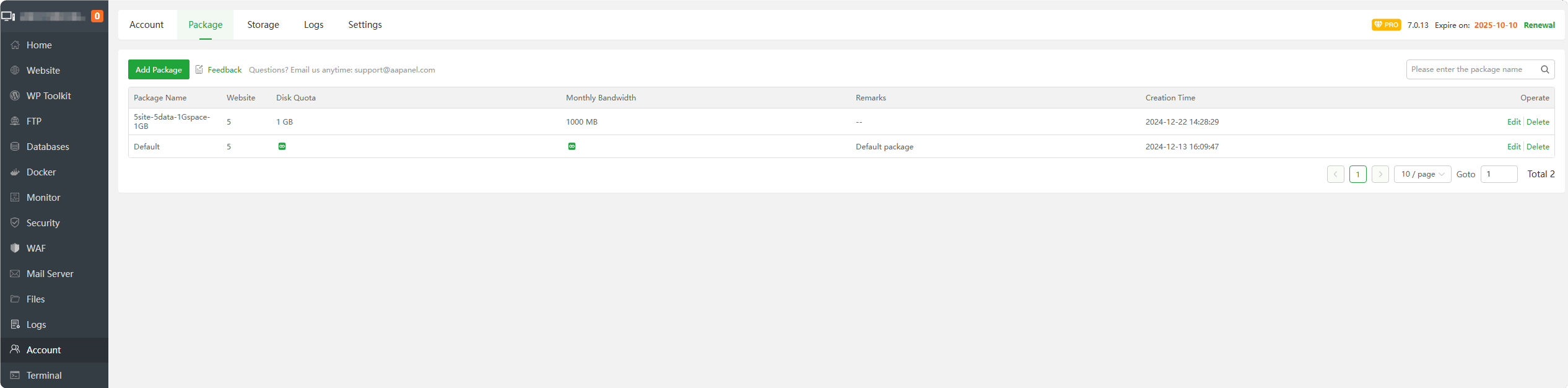
Add Package : Add a new resource pack
Package Name : The name of the resource package
Website :
Number of websites availablefor the resource packageDisk Quota : The
amount of disk space availablefor the resource packageMonthly Bandwidth :
Monthly traffic availablefor the resource packageRemarks : Notes on the resource package
Creation Time : The time when the resource package was created
Edit : Modify resource package
Delete : Delete resource package
Add Package

Resource Name : Enter the resource package name
Remarks : Enter the remarks of the resource package
Disk Space Quota (MB) : Enter the resource package
disk space sizein MB, which can be unlimitedMonthly Bandwidth Limit (MB) : Enter the
monthly traffic sizeof the resource package in MB, which can be unlimitedMax Number of Websites : Enter the
number of websites availablefor the resource package, which can be unlimitedStarting Subprocess : Enter the
minimumnumber of PHP sub-processes for the resource packageMax Subprocesses : Enter the
maximumnumber of PHP sub-processes for the resource packageMax Databases : Enter the
number of databases availablefor the resource package, which can be unlimited
Storage
When creating a user, the user information will be stored in this space
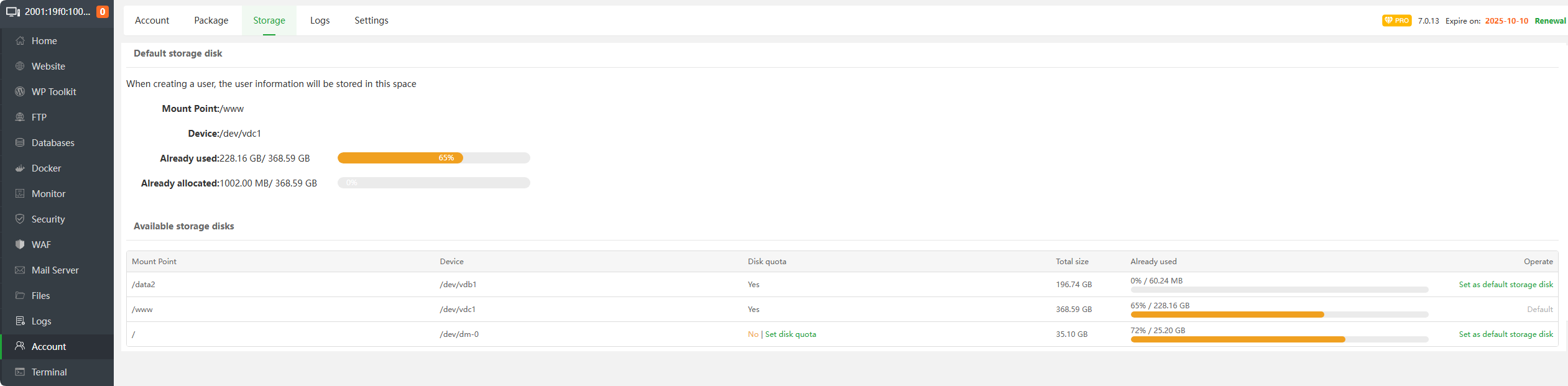
Mount Point : Display the mount point of the hard
disk partitionDevice : Display partition device
Disk quota : Displays whether hard disk
space limitis enabled, supportsXFS,EXT4partition format.- After some partitions are opened, the
startup fileof the operating system needs to be modified. Please follow the prompts after making aserver snapshot backup.
- After some partitions are opened, the
Total size : Display the total size of the partition
Already used : Display the used size
Set as default storage disk : Set as the default storage partition. After setting, the
user's data will be saved in this partition.
Logs
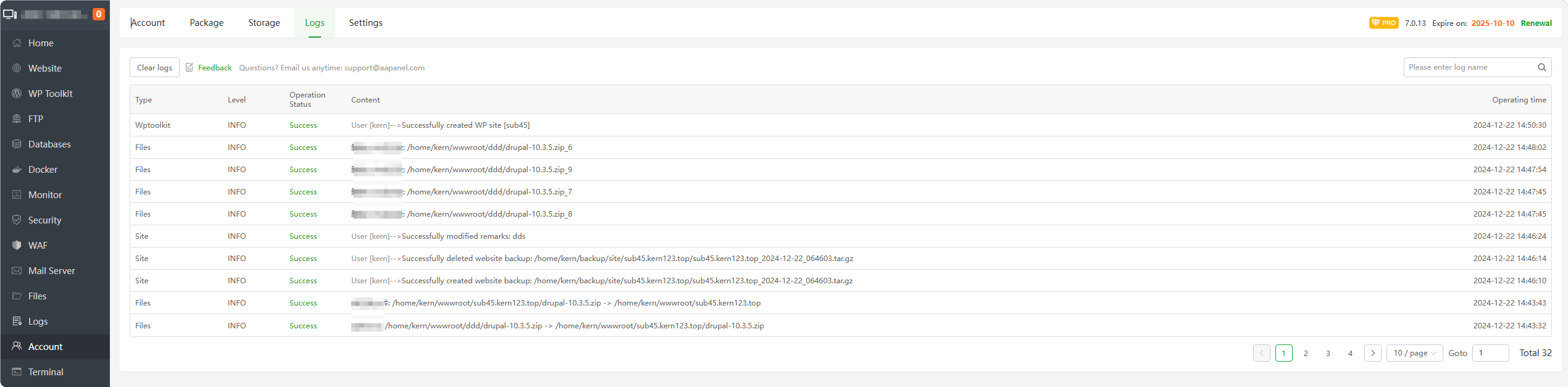
ViewandclearAccount logs
Settings
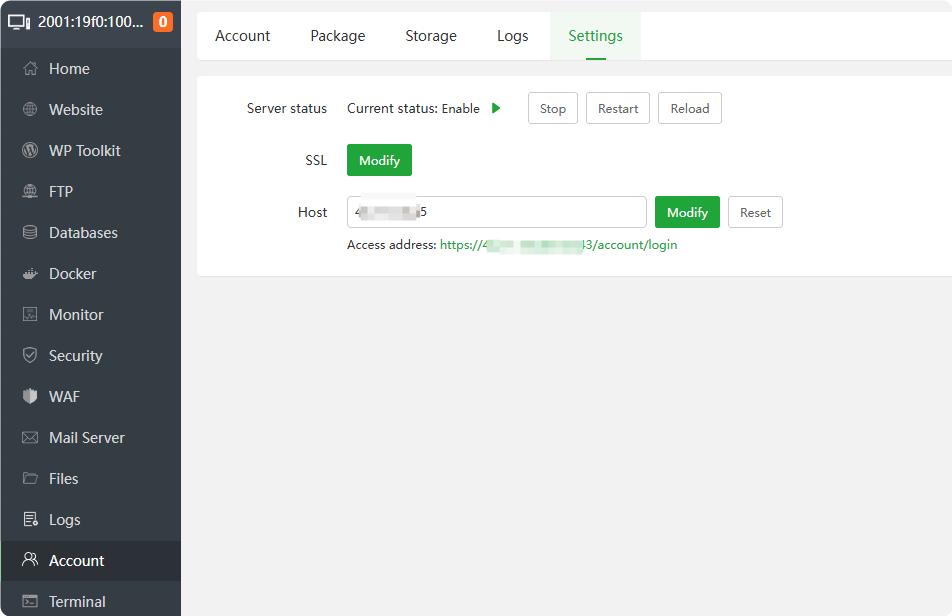
Server status : Displays the running status of the Account service, and can operate
Stop,Restart,ReloadSSL : Modify SSL certificate content
Host : Configure a
domain, or change theIP. This address is the address foraccessing the Account(Sub aaPanel) service.
Feedback or Suggestions
If you encounter problems or suggestions during use, please contact us through the following methods:
- (Please describe in
detailor providescreenshots)
Email: [email protected]
Discord: https://discord.gg/Tya5yceBpd
Telegram: https://aapanel.com/tg
GitHub: https://github.com/aapanel/aapanel
If you like aaPanel, please give it a Star