
MySQL
Management Local and remote MySQL, MariaDB
In order to ensure data security, it is recommended to use Cron to back up the database every day when you are idle to avoid data loss.
MySQL Overview
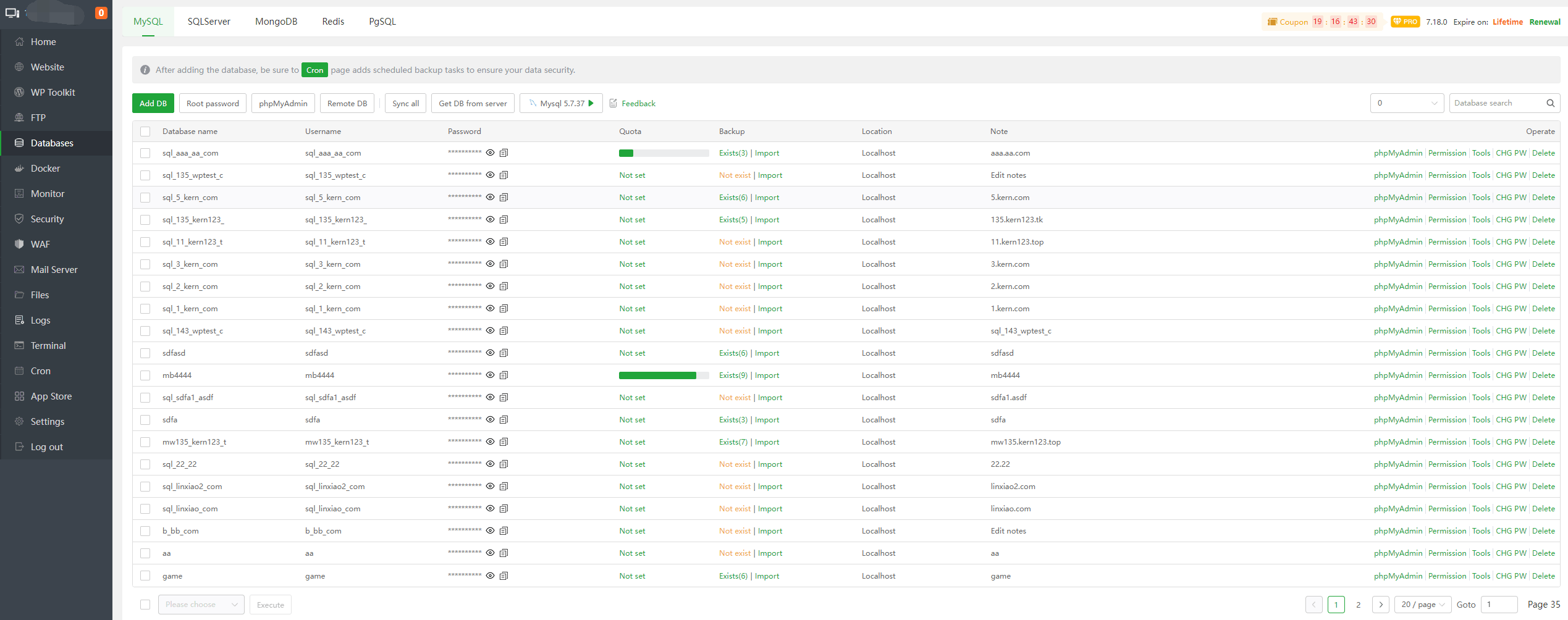
| Function | Describe |
|---|---|
| Add DB | Add database to local MySQL or remote server MySQL |
| Root password | View and modify the root password of the local MySQL |
| Remote DB | Add or manage databases on remote servers |
| Sync all | Synchronize the database list of aaPanel to local MySQL |
Obtain the database list from the local MySQL or remote server and synchronize it to aaPanel | |
Database name | Display current database name |
| Username | Display the user name of the current database |
| Password | View, Copy the password of the current database |
| Quota | Display, Set the space limit of the current database |
| Backup | Displays the number of backups, click on it to display Backup, Download, Restore, Delete the current database file |
| Import | Upload, Select files and import them into the current database |
| Location | Displays the physical storage location of the current database |
| Note | Display notes for the current database |
| phpMyAdmin | Use phpMyAdmin to manage local MySQL databases |
| Permission | Display, Set the user login permissions of the current database |
| Tools | Use Repair, Optimize, Convert to MyISAM/InnoDB to repair, optimize, and convert the table to MyISAM/InnoDB |
| CHG PW | View, Modify the password of the current database |
| Delete | Delete current database, Tip: Please make a backup before deleting |
Add DB
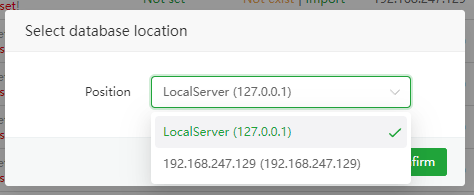
Add a database to local MySQL or remote server MySQL
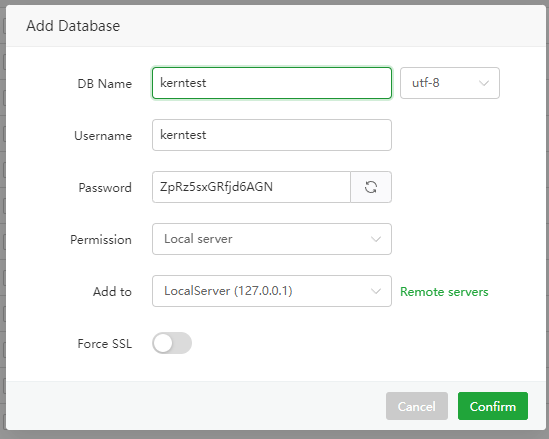
| Function | Example | Describe |
|---|---|---|
| DB Name | kerntest | Database name |
| utf-8 | utf-8 | Database character: utf8mb4, utf-8, etc. |
| Username | kerntest | Database username |
| Password | ZpRz5sxGRfjd6AGN | Database password |
| Permission | Local server | Login permissions: Specified IP, Everyone, Local server |
| Add to | Local server | Database storage server: Local server, Remote server |
| Force SSL | Close | Force SSL connection |
Root password
VieworModifythe local Mysql root password
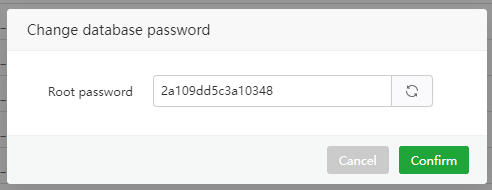
phpMyAdmin
Service:
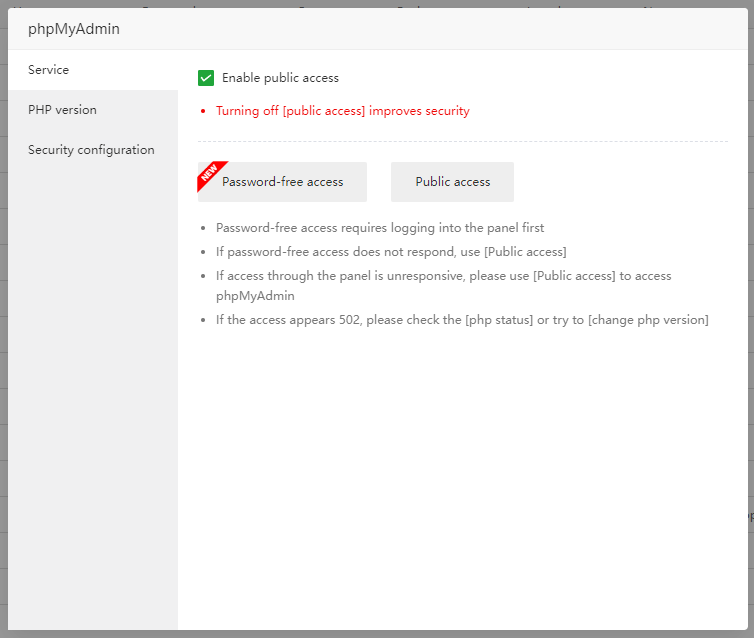
Enable public access: Allow public access
Password-free access:
Password-free accessrequires logging into phpMyAdminPublic access: Open
phpMyAdmin login pagewhen clicked
PHP version:
CheckandChangethe PHP version used by phpMyAdmin.Security configuration
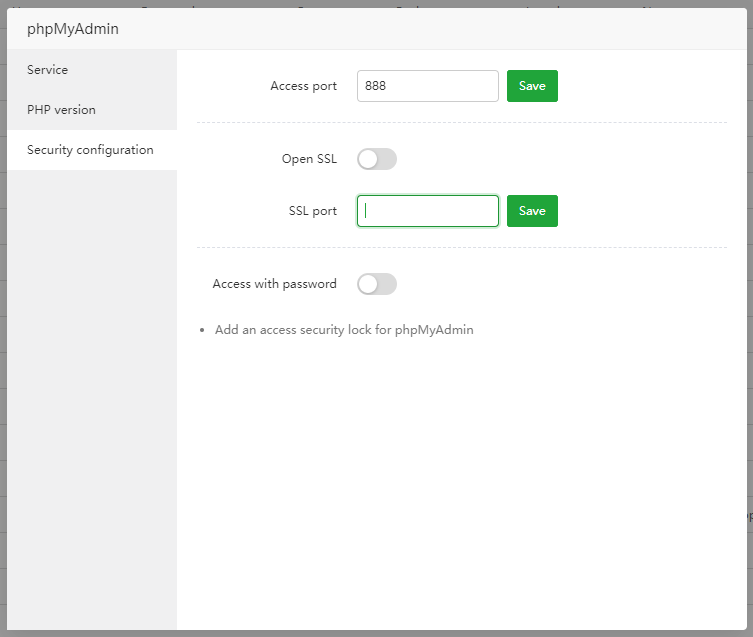
- Access port: phpMyAdmin
httpaccess port - Open SSL / SSL port: phpMyAdmin
httpsaccess port - Access with password: phpMyAdmin access with password
- Access port: phpMyAdmin
Remote DB
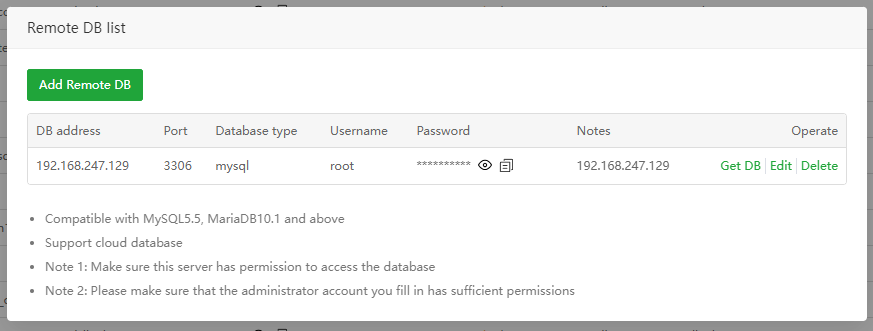
- Add and Manage Remote DB :
- Support MySQL5.5, MariaDB10.1 and above versions
- Support cloud databases from cloud vendors
- Please ensure that this server has
permissionto access the database- Please ensure that the administrator account you fill in has sufficient permissions
- Database root installed through aaPanel does not support remote permissions by default
- The remote server system firewall and the server provider's security group need to open the MySQL port.
Sync all
- Synchronize aaPanel database list to local MySQL
Get DB from server
Tip: Database password cannot be synchronized
Obtain the database list from
local MySQLand synchronize it to aaPanelObtain the database list from the
remote serverand synchronize it to aaPanel.
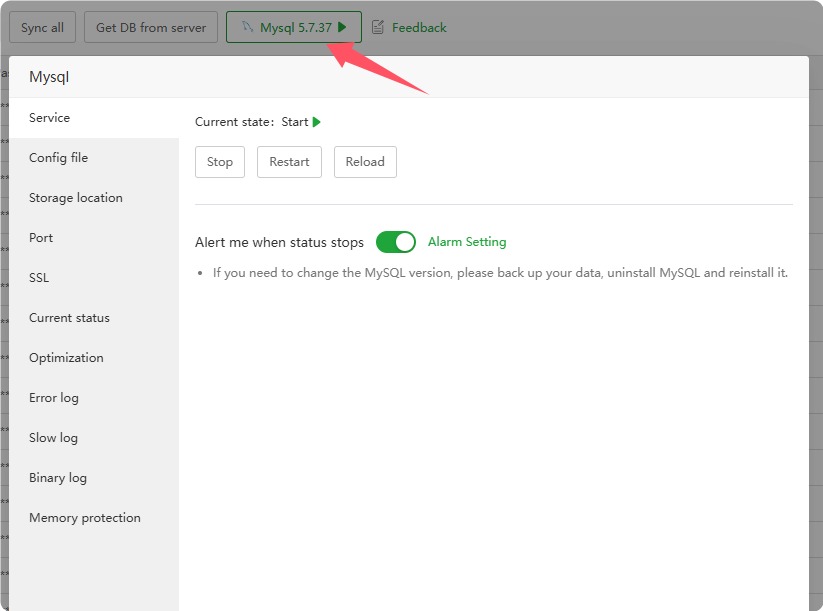
MySQL Manager
Supports management of
MySQL,MariaDBconfiguration, servicestatus,current status,logs, etc.
Permission
Modify the user login permissions of the specified database
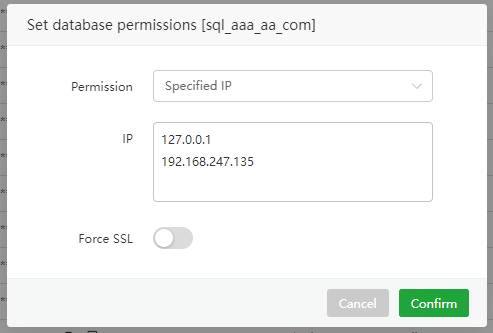
| Function | Example | Describe |
|---|---|---|
| Permission | Specified IP, Everyone, Local server | Specified IP, Everyone, Local server can have permission to log in to the database |
| IP | 127.0.0.1, 192.168.247.135 | Specify the IP address to log in |
| Force SSL | Close | Force SSL connection |
Specified IP : Only the
specified IPcan be logged in using the database user and password.Everyone : Allow
all IPsto log in using the database user and passwordLocal server : Only local login is allowed, that is:
127.0.0.1,localhost
Tools
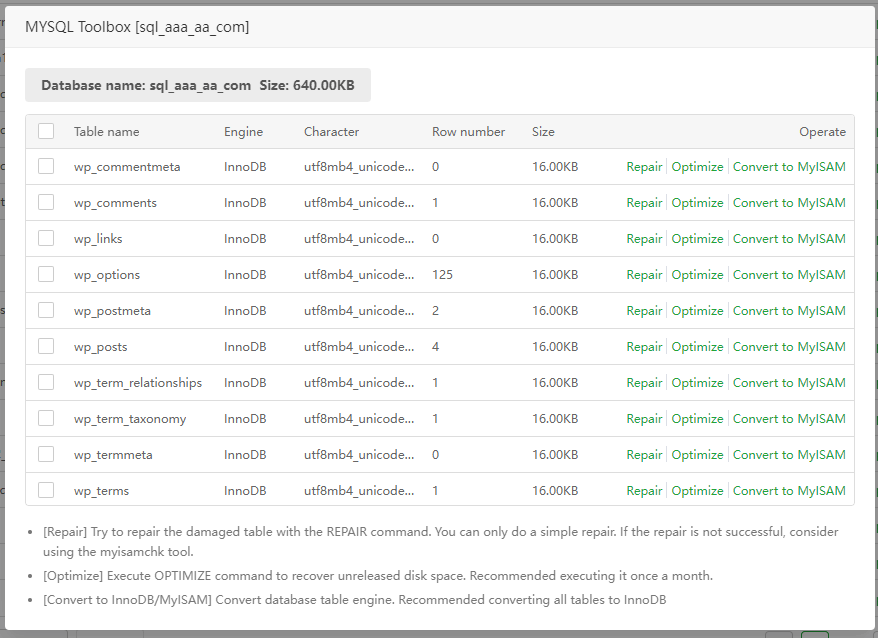
| Function | Example | Describe |
|---|---|---|
| Table name | wp_commentmeta | Display the name of the current table |
| Engine | InnoDB | Display the table engine for the current table |
| Character | utf8mb4_unicode_520_ci | Display the character of the current table |
| Row number | 152 | Display the number of rows in the current table |
| Size | 16.00KB | Display the table size of the current table |
| Repair | command | Execute REPAIR command to recover table data. |
| Optimize | command | Execute OPTIMIZE command to recover unreleased disk space. |
| Convert to MyISAM/InnoDB | command | Convert table engine. |
CHG PW
Viewandmodifythepasswordof the specified database in batches
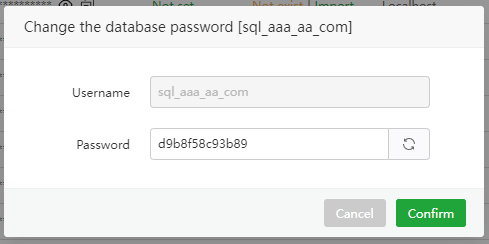
Quota
Viewandmodifythe spacequotaof the specified database

Backup
View, restore, backup, delete, download backup files of the specified database
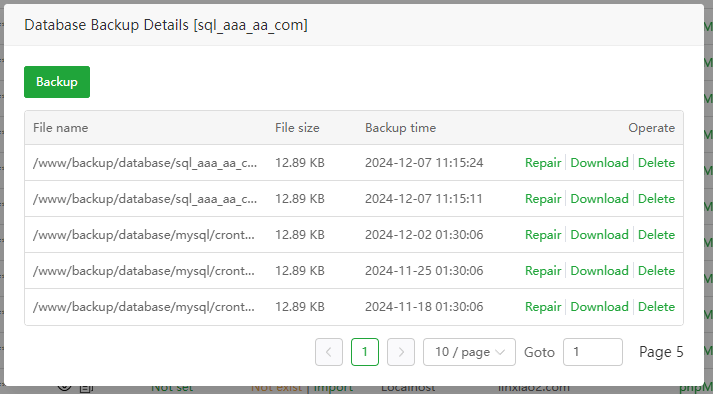
Backup:
Backupthe current databaseRepair:
Restorethe current database. Note that this operation will overwrite the current database. Pleasebackup firstbefore performing this operation.Download:
Downloadthe backup file of the current databaseDelete:
Deletethe backup file of the current database
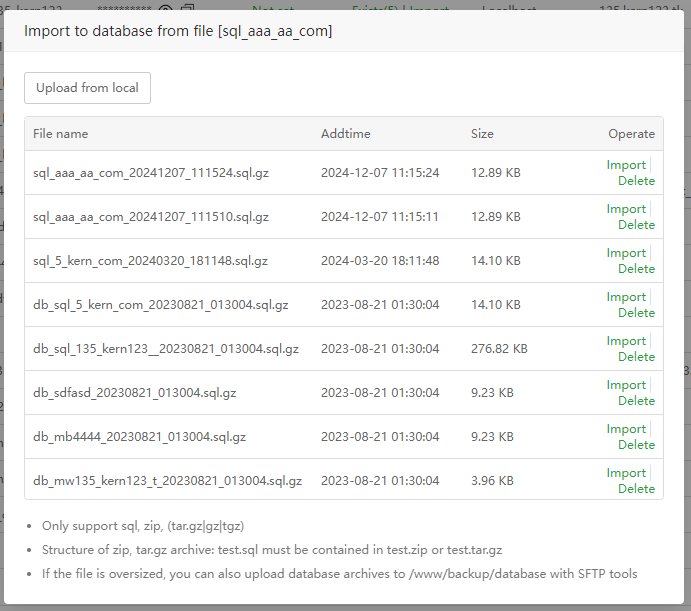
Import
Upload or select files to import into the current database
Upload from local:
Upload filesfrom local to import to the current databaseImport:
Restorethe current database. Note that this operation will overwrite the current database. Pleasebackup firstbefore performing this operation.Delete:
Deletefile
Batch operation
Sync to Server:
Synchronizethe specified database to MysqlDB backup: Batch
backupdatabaseDelete database:
Deletedatabase in batches, Tip: Please make abackupbefore deleting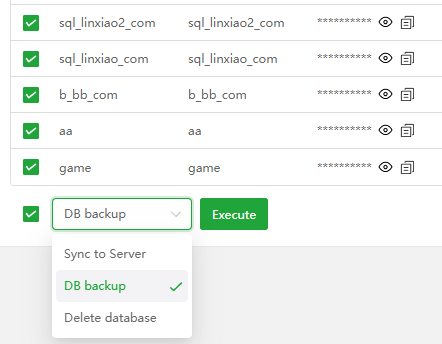
Feedback or Suggestions
If you encounter problems or suggestions during use, please contact us through the following methods:
- (Please describe in
detailor providescreenshots)
Email: [email protected]
Discord: https://discord.gg/Tya5yceBpd
Telegram: https://aapanel.com/tg
GitHub: https://github.com/aapanel/aapanel
If you like aaPanel, please give it a Star