
Critical PHP Security Update (October 2026)
The PHP team released a security update on Oct 21, 2026 at 14:00 UTC, fixing two critical vulnerabilities with a CVSS score of 9.2: CVE-2026-109618 and CVE-2026-109619. Upgrade as soon as possible.
Protect your websites with aaPanel Pro
Cannot update PHP right away? Enable Nginx WAF protection with aaPanel Pro.
Pro's Nginx WAF can effectively block known attack attempts targeting CVE-2026-109618 and CVE-2026-109619, helping protect your Nginx websites while you prepare to update PHP.
Already using Pro? Install or update Nginx WAF in the App Store and enable protection for your websites.
Get protection with Pro: Explore aaPanel Pro
Update PHP to a patched build as soon as possible to fix the underlying vulnerabilities.
PHP security updates are free for all users, including Free edition users. Updating to a patched build fixes these two vulnerabilities; no Pro subscription is required.
Summary
| Item | Details |
|---|---|
| CVEs | CVE-2026-109618, CVE-2026-109619 |
| Severity | Critical (CVSS 9.2) |
| Release date | Oct 21, 2026, 14:00 UTC |
| Patched versions | PHP 7.0 – 8.5 (details below) |
Back up before upgrading
Take a server snapshot through your cloud provider before upgrading. If snapshots are not available, back up your websites, databases, and PHP configuration first.
Update PHP in aaPanel
Version coverage
- Official PHP fixes: PHP 8.2 – 8.5
- aaPanel builds: PHP 8.0, 8.1, and 7.4
- aaPanel backports: PHP 7.0 – 7.3, based on the official 7.4 patch
All are available in the App Store.
Update steps
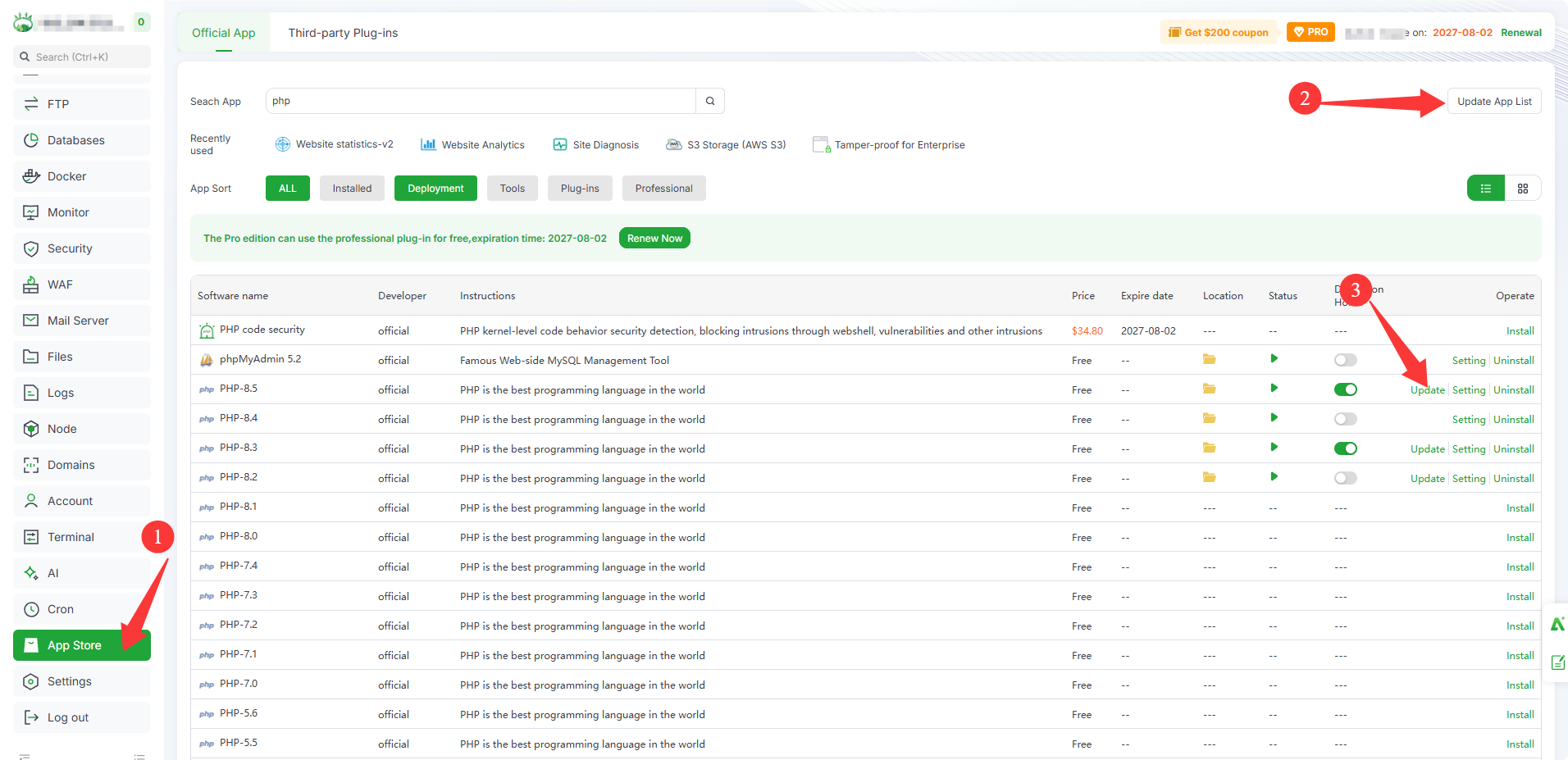
- Open the
App Store. - Click
Update App Listin the top-right corner to refresh the list. - Find the PHP version you use and click
Update.
If you have multiple PHP versions installed, update each one.
| PHP | Version | Notes | Source |
|---|---|---|---|
| 8.5 | 8.5.12 | Official PHP security release | Download |
| 8.4 | 8.4.27 | Official PHP security release | Download |
| 8.3 | 8.3.36 | Official PHP security release | Download |
| 8.2 | 8.2.35 | Official PHP security release | Download |
| 8.1 | 8.1.35 | aaPanel build for Linux | Download |
| 8.0 | 8.0.31 | aaPanel build for Linux | Download |
| 7.4 | 7.4.34 | aaPanel build for Linux | Download |
| 7.3 | 7.3.34 | aaPanel backport; available in the App Store | Download |
| 7.2 | 7.2.35 | aaPanel backport; available in the App Store | Download |
| 7.1 | 7.1.34 | aaPanel backport; available in the App Store | Download |
| 7.0 | 7.0.34 | aaPanel backport; available in the App Store | Download |
PHP 7.x is end-of-life
Plan a migration to a supported branch as soon as possible.
PHP 5.4 – 5.6 test builds
aaPanel has released patched builds for PHP 5.4.46, 5.5.39, and 5.6.41. They are not available through the panel; use the commands below.
| PHP | Version | Notes | Source |
|---|---|---|---|
| 5.6 | 5.6.41 | aaPanel AI patched build; open testing; command-line update only | Download |
| 5.5 | 5.5.39 | aaPanel patched build; open testing; command-line update only | Download |
| 5.4 | 5.4.46 | aaPanel patched build; open testing; command-line update only | Download |
Open-testing builds
These builds have not been fully verified in production. Test them in a staging environment first, and back up your sites, databases, and PHP configuration or take a server snapshot before updating. The update restarts PHP; restore the snapshot if any extension or site stops working.
PHP 5.4 to 5.4.46
curl -fL -o php5_cve.sh https://node.aapanel.com/install/php5_cve.sh && sudo bash php5_cve.sh update 54PHP 5.5 to 5.5.39
curl -fL -o php5_cve.sh https://node.aapanel.com/install/php5_cve.sh && sudo bash php5_cve.sh update 55PHP 5.6 to 5.6.41 (aaPanel AI patched build)
curl -fL -o php5_cve.sh https://node.aapanel.com/install/php5_cve.sh && sudo bash php5_cve.sh update 56After updating
- Verify the PHP version.
- Check extension loading, site access, login, uploads, and database connections.
- Restore the pre-update snapshot if anything fails.
- Report results to aaPanel with your OS, PHP version, and installed extensions; redact sensitive data from logs.
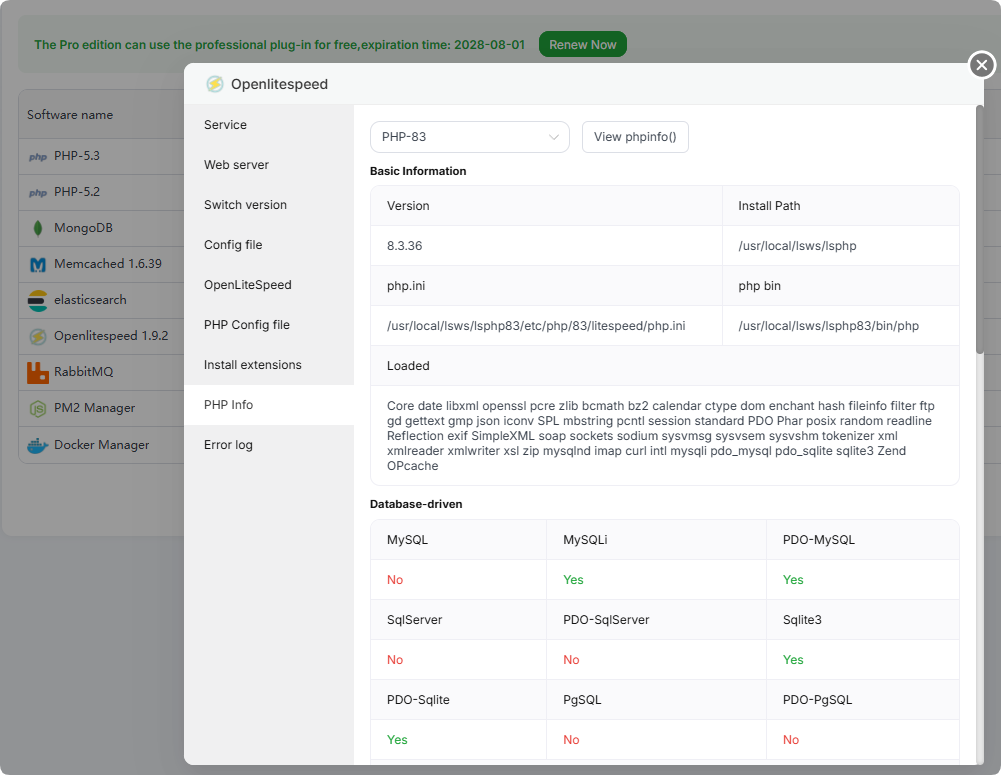
OpenLiteSpeed
If you use OpenLiteSpeed, update the lsphp packages first.
CentOS / AlmaLinux / Rocky:
yum update 'lsphp*' -yDebian / Ubuntu:
apt-get update
apt-get install --only-upgrade 'lsphp*' -y
Then open the OpenLiteSpeed interface and confirm that the PHP version is the patched build.
If you cannot update immediately
Protect your websites with aaPanel Pro's Nginx WAF
aaPanel Pro's Nginx WAF can effectively block known attack attempts targeting the PHP php2shell vulnerabilities CVE-2026-109618 and CVE-2026-109619, providing protection while you prepare to update PHP.
For websites using Nginx, enable protection as follows:
- Open the
App Storeand install or updateNginx WAFto the latest version. - Enable WAF protection for the affected websites.
- Verify that protection is active for each website.
Keep PHP up to date
WAF provides an additional layer of protection. Update PHP to a patched build as soon as possible to fix the underlying vulnerabilities.
Temporary mitigations
Use these only if you cannot update PHP immediately. Updating to a patched build is the only complete fix. 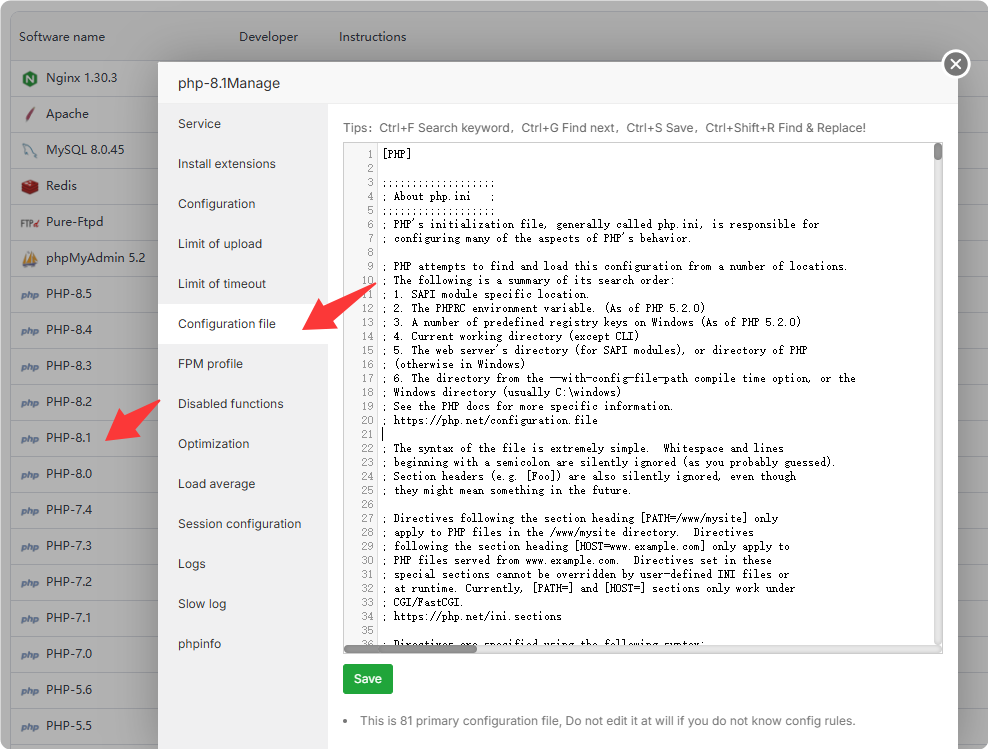
CVE-2026-109618: RCE via OOM corruption
- Set
memory_limit=-1, preferably where applications cannot override it, such asphp_admin_valuein the FPM pool or Apache configuration. Check that no pool, directory, or application setting applies a finite limit again. This removes the controllable memory-limit failure, but an underlying allocation failure can still reach the vulnerable path. - Set a low
post_max_size:8Mif the application does not need file uploads,32Mif it does. Keepupload_max_filesizebelowpost_max_size. Consider enforcing limits at the web server or proxy level for decoded request size, input field count, multipart part count, header count, and nesting depth, including requests without a usableContent-Length. - Use a container or cgroup limit as an availability boundary, preferably with a policy that kills only the affected worker. Do not substitute
RLIMIT_ASorRLIMIT_DATA; they can cause the vulnerable allocation failure.
CVE-2026-109619: RCE via stale global state
- Set
session.upload_progress.enabled=0and restart every worker. Apply it throughphp.ini, an FPM pool, or server configuration that takes effect before request parsing. Do not rely onini_set()or FPM.user.ini. This blocks the confirmed session paths but not other variants. - On PHP 8.5, set
fatal_error_backtraces=0and restart every worker. This blocks the confirmed fatal backtrace path only. - Remove invalid or deprecated settings applied per request that emit diagnostics before initialization. Hiding diagnostics with
error_reporting,display_errors, or@does not help. - Fix attacker-reachable fatal errors and execution timeouts, including failures in callbacks, upload or import processing, and cleanup.
TIP
Restart PHP manually after changing the configuration so that every worker applies the new settings.