
Critical PHP Security Update (November 19, 2026)
On November 19, 2026, the PHP team released a security update that fixes 7 Critical, 4 High, and 6 Medium vulnerabilities. All 7 Critical issues have a CVSS 4.0 score of 9.2. Some may lead to remote code execution depending on the deployment, configuration, or application.
Patched aaPanel PHP builds are available for the 8.2, 8.3, 8.4, and 8.5 branches. Check the PHP version used by each website and update as soon as possible.
Summary
| Item | Details |
|---|---|
| Severity | 7 Critical (CVSS 9.2), 4 High, and 6 Medium |
| Fixed versions | PHP 8.2.36, 8.3.37, 8.4.28, and 8.5.13 |
| Published | 2026-11-19 |
| Affected branches | PHP 8.2, 8.3, 8.4, and 8.5 |
| Fix coverage | PHP 8.5.13 fixes all 7 Critical issues; 8.2.36, 8.3.37, and 8.4.28 fix the issues affecting those branches. |
IMPORTANT
PHP 8.1 and earlier are no longer maintained by the PHP project. If you still use an older branch, confirm with your distribution or service provider whether the vulnerabilities are patched, and plan a migration to a supported branch.
Back up before upgrading
Create a server snapshot or back up websites, databases, and PHP configuration before upgrading. The update may restart PHP services; use a maintenance window where possible.
Update PHP in aaPanel
You can update PHP directly from the App Store; updating the aaPanel version first is not required.
- Open
App Store. - Click
Update App Listin the top-right corner and wait for the list to refresh. - Find the PHP branch used by your websites and click
Update. - Confirm that the latest version matches the patched version for that branch, then click
Update Now. - After the update, verify the PHP version, service status, and loaded extensions. Test website access, login, file uploads, and database connections.
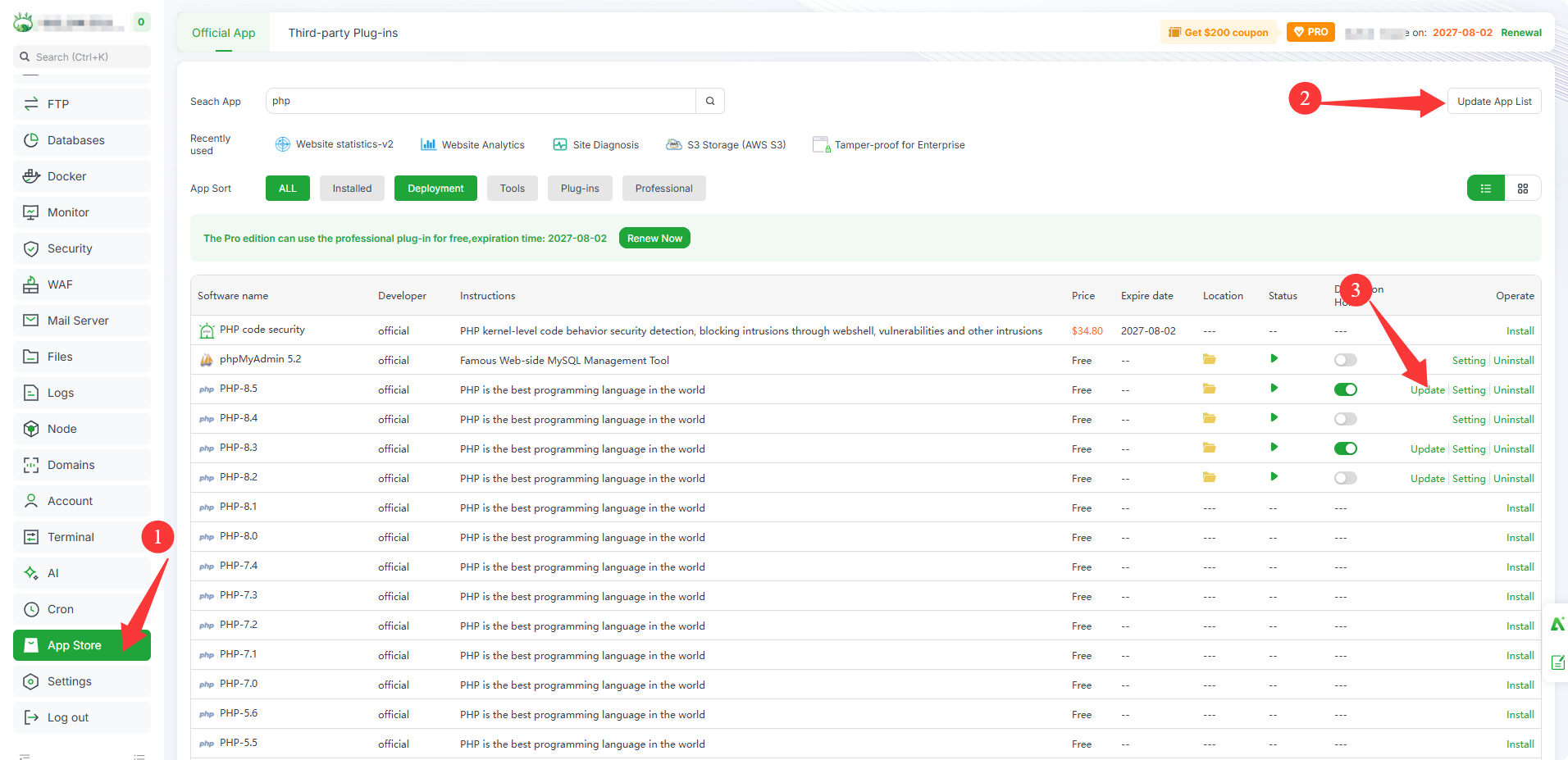
If multiple PHP branches are installed, check and update every branch that is still in use.
Critical vulnerabilities
| CVE | Issue |
|---|---|
CVE-2026-129289 | PHP-FPM request smuggling; may allow access-control bypass or remote code execution in specific deployments. |
CVE-2026-129496 | Use-after-free in the timezone cache; may cause a crash or remote code execution. |
CVE-2026-115560 | Session serialization format mismatch; may allow remote code execution in affected applications. |
CVE-2026-126714 | Interrupted session-file writes may leave stale data, leading to unsafe deserialization and remote code execution in affected applications. |
CVE-2026-129474 | Use-after-free involving error backtraces for magic methods; affects PHP 8.5 only. |
CVE-2026-129182 | Affects PHP 8.5 only; stale state in fatal-error backtraces may cause memory corruption or a process crash. |
CVE-2026-129481 | Interrupted session cleanup in PHP 8.3 to 8.5 may leave invalid references, causing a crash or remote code execution. |
The update also fixes 4 High vulnerabilities: CVE-2026-129291, CVE-2026-128090, CVE-2026-128064, and CVE-2026-127960, and 6 Medium vulnerabilities.
Temporary mitigations
Use these measures only when an immediate upgrade is not possible. They reduce only part of the risk; installing the patched PHP version is the complete fix.
PHP-FPM request smuggling
Review the FastCGI connection settings between the web server and PHP-FPM:
- Nginx: keep
fastcgi_keep_conndisabled. - Apache with
mod_proxy_fcgi: keepenablereusedisabled. - Other FastCGI frontends: disable backend connection reuse.
- Restrict PHP-FPM and LSAPI listening ports so they are not reachable from the public internet or other untrusted networks.
Timezone cache use-after-free
Check the PHP startup log and fix invalid or deprecated configuration that emits diagnostics during startup. Restart the PHP master process and all workers. If necessary, evaluate sending the PHP error log to syslog.
PHP 8.5 fatal-error backtraces
Disable fatal-error backtraces in the configuration actually loaded by the affected PHP service:
fatal_error_backtraces = 0For CVE-2026-129474, you can also prevent exception backtraces from recording arguments:
zend.exception_ignore_args = 1These settings reduce diagnostic information. Reassess them after upgrading.
Session cleanup interruption
Investigate fatal errors that may occur during session cleanup. For PHP-FPM, you can temporarily set the following in the affected pool so that each worker exits after handling one request:
pm.max_requests = 1Frequent worker creation and exit can significantly affect performance. Evaluate the impact before applying this setting.
Session deserialization and partial file overwrite
If upload progress is not required, disable it to mitigate CVE-2026-115560 and reduce the risk from CVE-2026-126714 in some scenarios:
session.upload_progress.enabled = 0After upgrading, check for configurations that explicitly enable upload progress. Patched releases disable it by default, but an explicit setting can override the new default.
If upload progress is required, make sure applications and processes sharing the same session storage use the same session.serialize_handler setting. Validate how applications handle external input and limit the amount of untrusted data written to sessions.
Verify the configuration
Apply changes in the php.ini, PHP-FPM pool, or web server configuration that is actually loaded by the affected service. Settings needed early in request processing must be applied at the service layer. Restart PHP after making changes and reload the web server if required, then confirm that the settings are active and websites still work correctly.